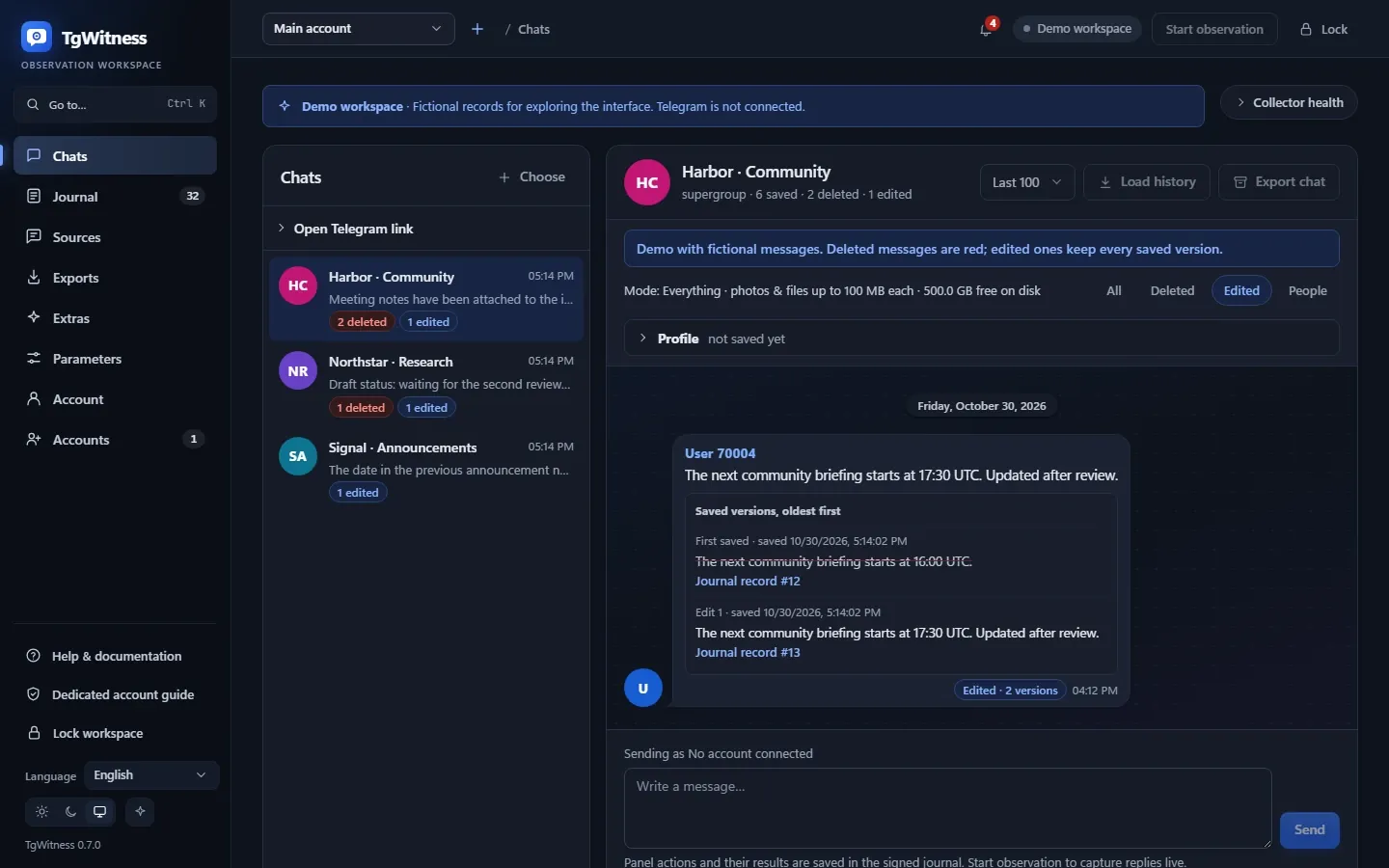
Edits and deletions, kept
Every observed version is stored without overwriting the one before. When a message is deleted, the text you already captured stays next to the deletion notice, and starred sources are rechecked on their own schedule.

TgWitness
Telegram's own export hands you a file anyone can edit. TgWitness keeps every message, every edit and the text of every deleted post in a signed journal, can prove when and where it was captured, and hands it over with a verifier anyone can run.
The demo runs in your browser with fictional records. No Telegram sign-in.
Send USDT (TRC-20) to TQ7x…9fA2
Send USDT (TRC-20) to TR3m…k81D
Gone from Telegram. The captured text stays in your journal.
The post disappears. The captured history remains.
Fictional example01The problem
Open an export in a text editor, change a 1 to a 2 and save. Nothing complains, and there is nothing to compare it against. Telegram does not sign messages, not in an export and not anywhere else. Screenshots and deletion logs share the same weakness: whoever holds the file holds the story.
TgWitness signs what your account saw, links every record to the one before it and ships the verifier inside the archive. The person who receives it checks the record instead of trusting whoever collected it.
Send USDT (TRC-20) to TQ7x…9fA2
Deletion notice for message 42
The recalculated hash matches the saved one. All three links agree.
Export Clinic · controlled experiment · 3 November 2026
Download Telegram Desktop, sign in and export seven test chats. Then a small local helper changes selected files. The official client is untouched, and the altered export reads like any other.
Before the local change
RESULT: FAIL
Hidden text remains selectable beneath the black rectangle.
JSON SHA-256d58d19814e1e07d5…
After the local change Altered
RESULT: PASS
All sensitive text has been permanently removed.
JSON SHA-25683a0a37eb7110d51…
TgWitness signs at the moment of capture. For the strongest cases it captures where nobody can reach the data: in GitHub Actions or inside an Intel TDX machine. See the trust levels
02Compare
Telegram's own export is a convenience copy: the last version of whatever is still there, in files anyone can edit. TgWitness is built for evidence, from the first observation to the hand-over.
| What you need | Telegram Desktop export | VSTgWitness |
|---|---|---|
| Edited message | Only the final text | Every version, in order |
| Deleted post | Gone from the export | Text and files kept, deletion logged |
| Someone edits the file | Nothing notices | One changed byte breaks the chain |
| Signature | None | Ed25519 on every record |
| Who can verify it | Nobody | Anyone, offline, with the verifier in the archive |
| When it was captured | Your word | RFC 3161 and Bitcoin timestamps |
| Where it was captured | Your word | Attested by GitHub or Intel TDX |
| Messages cut or rolled back | Invisible | Caught by an independent witness |
| Bot buttons you pressed | Not recorded | A signed receipt for each press |
Tested on the official client: the Export Clinic altered 17 of 45 records, and the export still read like any other. See the experiment
| Artifact | Signature on every record | External time | Independent witness | Attested capture | Gaps reported | Verify without the author | Score |
|---|---|---|---|---|---|---|---|
| Telegram Desktop export | No | No | No | No | No | No | 0/6 |
| Telethon snapshot script | No | No | No | No | No | No | 0/6 |
| Deletion logger (text log) | No | No | No | No | No | No | 0/6 |
| Screenshots or web capture | No | No | No | No | No | No | 0/6 |
| TgWitness | Yes | Yes | Yes | Yes | Yes | Yes | 6/6 |
Compared as delivered. Scripts and loggers vary by implementation.
03How it works
Sign in with a phone code or QR, or bring an existing session: Telegram Desktop TData, Telethon, Pyrogram, StringSession or an auth key. Each account gets its own workspace, vault and signing key.
Selected chats, a Telegram folder or the whole account. Investigation mode adds bots, private chats, your own actions and a 200-message snapshot of every newly discovered source.
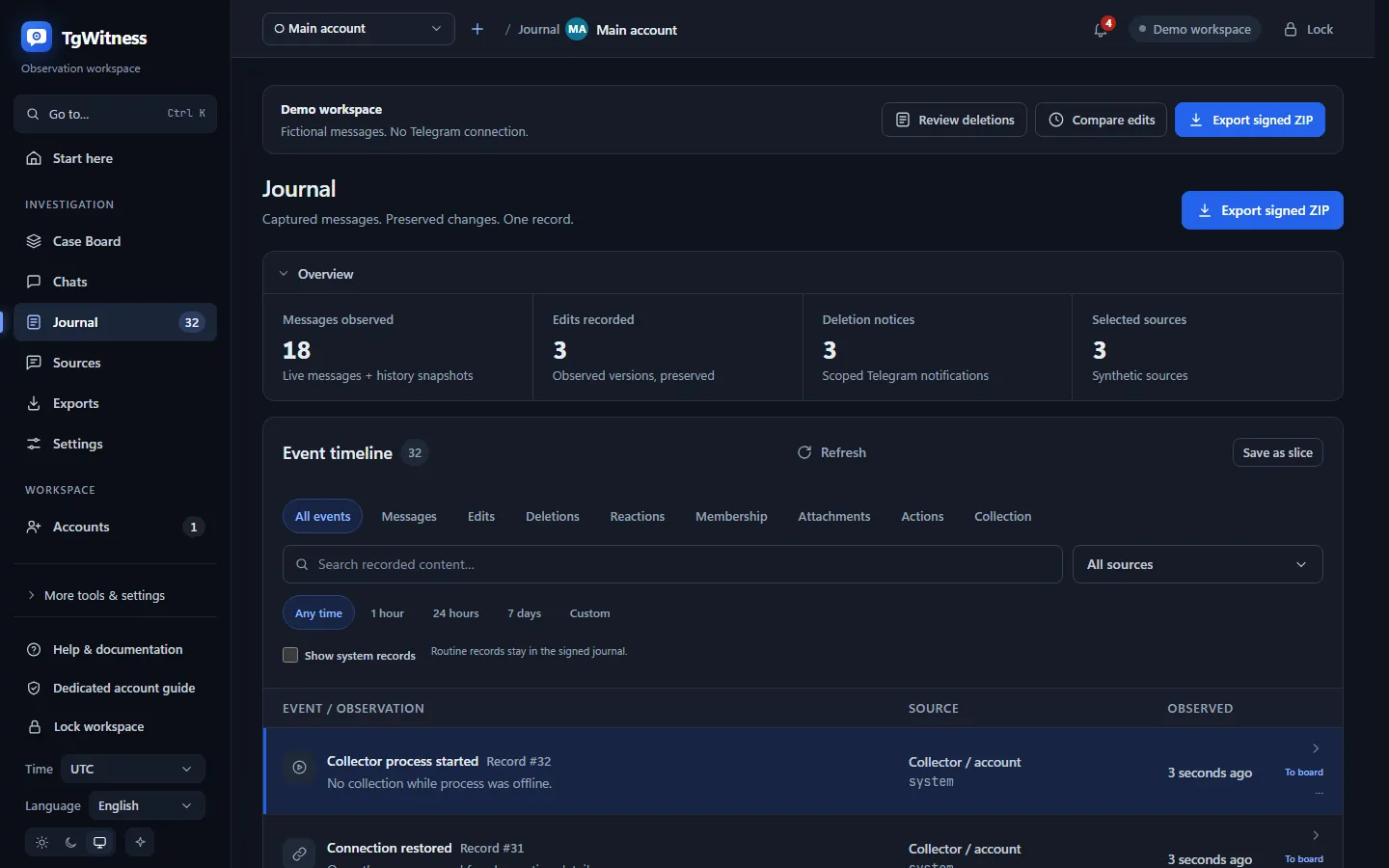
New messages, edits, deletions, reactions and membership changes enter the journal as they arrive. Attachments are saved with their SHA-256 and byte count.
Search every source, follow a person by numeric Telegram ID, pin evidence to the Case Board and build a report in one of eight designs.
Export a signed ZIP with the original JSONL, CSV, offline HTML, preserved files, a signed manifest and the verifier. The recipient checks it without your server.
04The workspace
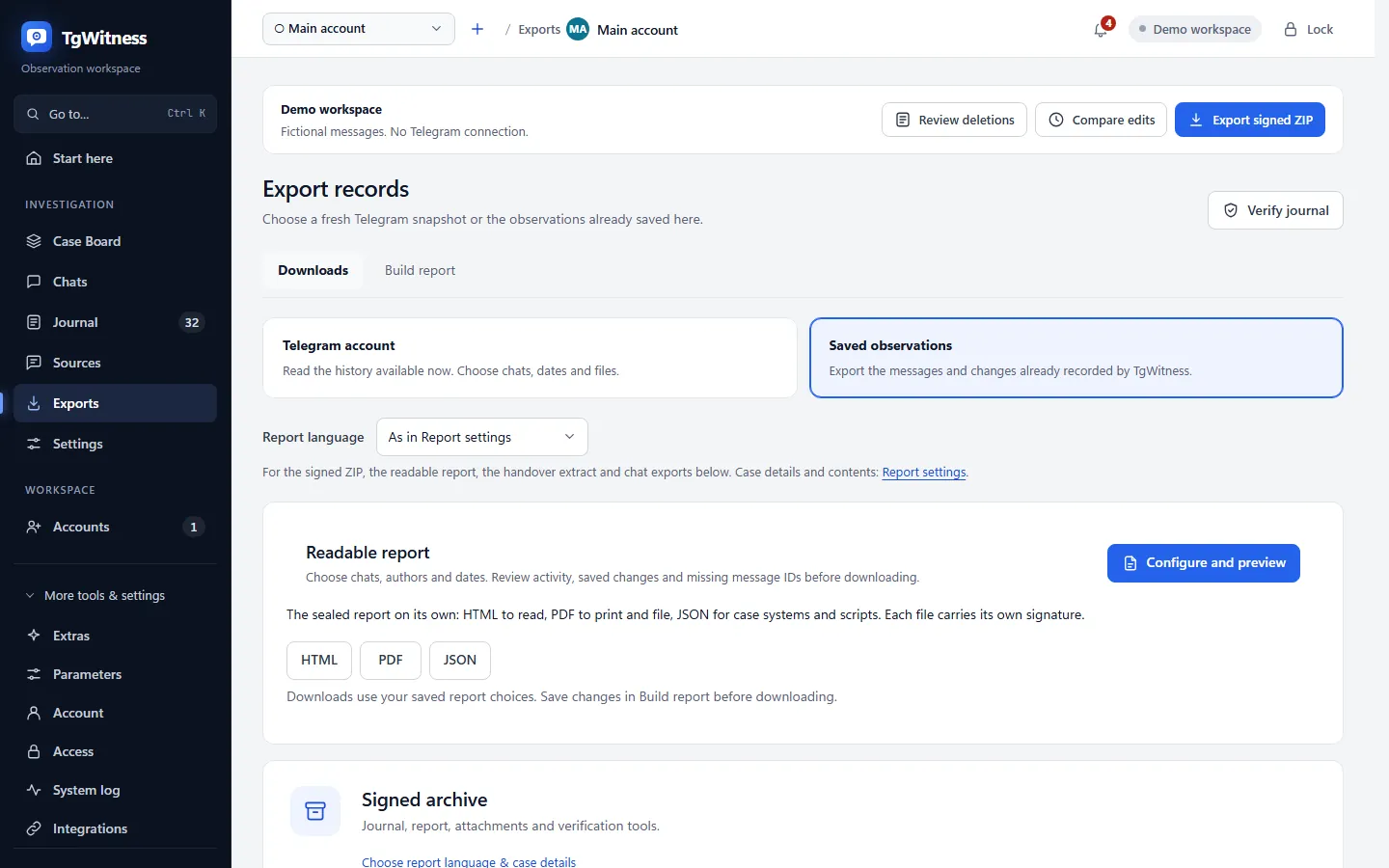
05Capabilities
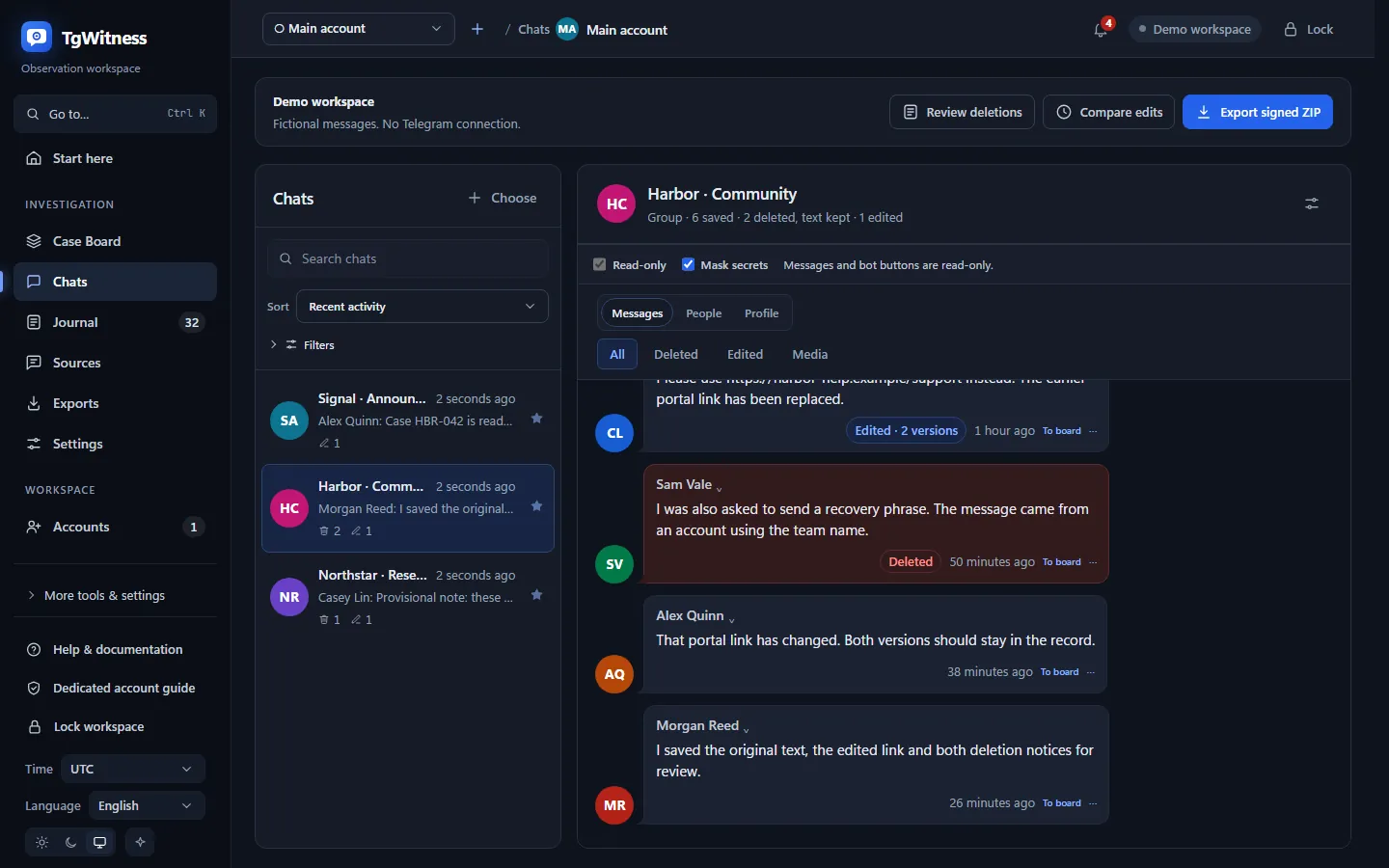
Collection is where it starts. The panel also covers the work that follows: people, bots, notes, reports, teammates and the infrastructure around them.
Every observed version is stored without overwriting the one before. When a message is deleted, the text you already captured stays next to the deletion notice, and starred sources are rechecked on their own schedule.
Names and usernames over time, replies, “Also in…” other chats, and mentioned wallets, phones and links. Every fact cites its journal records.
Save a link preview, start a bot with its parameter, reply or press a current button. Request and result become signed receipts; a changed keyboard is refused before the press.
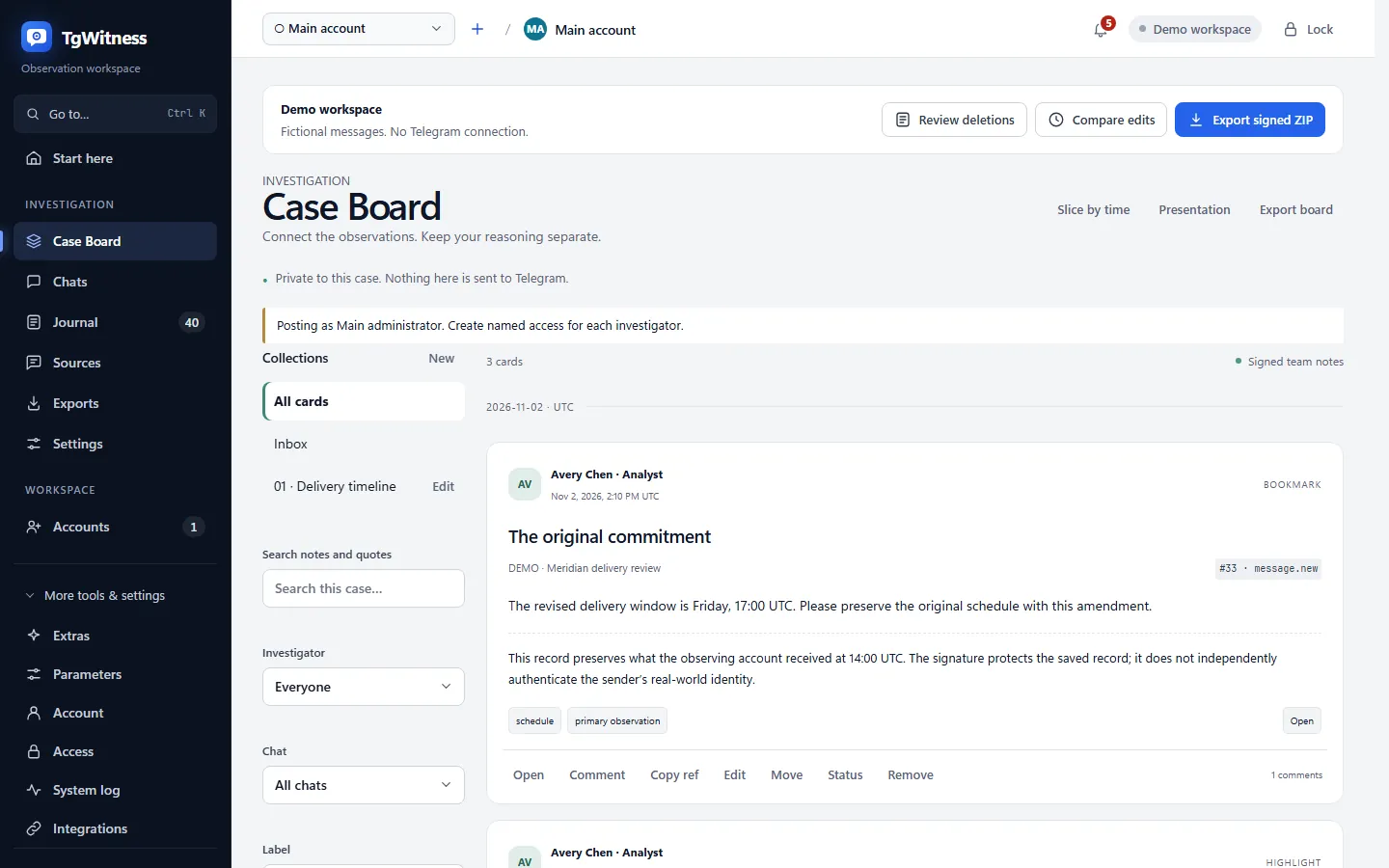
Bookmark observations, highlight an exact quote, group cards into collections and discuss them. Team notes are signed and stay separate from the evidence.
Eight document designs with charts, transcript and findings. Edits show before and after with the changed words highlighted, and gaps in message IDs are listed. HTML, PDF and JSON each carry their own signature.
Load the available past of enabled chats with pause and resume. The message, its file job and the cursor commit together, so a restart repeats nothing and loses nothing.
Local search first. Optional AI, off by default and local through Ollama or a provider you choose, answers with excerpts you can open in the journal.
Connect an analyst client to chosen workspaces and chats. Thirteen read-only tools with expiry and revocation, from ranked search to pinned posts and verified image previews; MCP cannot send messages or touch the journal.
Read images and voice messages in an isolated local worker. Originals and their hashes stay unchanged; recognized text is marked as machine output.
Any number of workspaces, each with its own session, journal, signing key and route. Group accounts to share settings and import session files in bulk.
Give a reviewer one chat or an analyst export rights: personal tokens, ten permissions, expiry, IP limits and revocable sessions.
SOCKS5, HTTP CONNECT, MTProxy or portable WARP and WireGuard per workspace, with an automatic MTProxy pool from four public sources. Hide IP mode waits for a proxy instead of falling back to a direct connection.
Problem alerts and chat changes through Apprise, HMAC-signed webhooks with retries and an n8n example. Message excerpts are off by default.
Journal, files, checkpoints and chat exports are encrypted with AES-256-GCM on your machine before upload to S3-compatible storage, with Object Lock where the bucket supports it. A restore publishes files only after they verify, and older files move off the disk only after a verified readback.
Export every chat through Telegram Takeout, filtered by chat, sender, phrase, date and media. Each page gets a signed receipt, so a paused export resumes without losing its proof.
Build a signed derivative of an export: pseudonymize everyone or only outsiders, and mask names, links, emails and phone numbers. The original stays private and unchanged.
Add a Chromium recorder that saves PNG, MHTML and rendered text of a tab, or an AyuGram database recorder. Each runs apart, with its own key, chain and checkpoints.
Publish a read-only page of up to 64 public channels from 16 workspaces, with edits and deleted text. Visitors download the signed checkpoint and a consistency proof.
Phone, QR code or a raw Auth Key, or import a Telethon or Pyrogram session, a Telegram Desktop tdata folder, a StringSession or account JSON. Files are recognized by content.
Compare the installed program with any GitHub commit, file by file. Changed, extra and missing files are listed, and the result is saved to the journal.
06Investigation mode
Open a record for a chat and each step writes itself: what you sent, what came back and how long it took, edits, deletions, pages opened in the isolated browser, searches and notes. Every step cites its journal record and SHA-256, and fixing the document signs it.
One BagIt package carries the report, slides, verification page, signed original, files and indicators, plus a court folder ready for review.
A snapshot of the bot, person, channel or group: every @username, the numeric ID, Telegram's SCAM, FAKE and VERIFIED labels, bio, bot commands and photo. The next snapshot lists what changed, so a username swap mid-case is on the record.
Set what a chat has to yield: the payment route, the infrastructure, the people behind it. Goals close with the journal records that prove them, and prepared messages are matched to what was actually sent.
Reply delays, active hours by weekday in your time zone, the longest silences and the writing style: alphabet, message length, emoji, favorite words. All read from Telegram's own timestamps.
With an AI provider set up, draft your next message in the other side's style, or translate their messages beneath the original. You see the exact request, model and endpoint before anything leaves, and every generation is journaled.
Words, patterns, wallets, @usernames, IDs, domains, phone numbers and links, matched in text, edits, hidden link targets, bot buttons, image codes and recognized text. A TON address matches in any spelling, and a subdomain counts for its domain.
Check watched accounts every one to sixty minutes in one batched request. The watch follows the numeric ID through renames and builds a picture of when each account is online.
QR codes in saved images become a wallet, an amount and a token tied to their message. EVM addresses must pass EIP-55, XRP Ledger addresses their checksum, and TON addresses collapse to one raw form.
Round video messages and voice messages carry the name of the software that encoded them, and Telegram records when each file was uploaded. A clip uploaded more than two minutes before the message presenting it as live is flagged to the second.
Record personas and authorizations with reference number, issuing authority, validity and covered chats. The undercover activity record lists each outgoing message with its operator and flags anything outside an authorization.
Manage the name, username, photo and thirteen privacy settings of your own account, the one you investigate with, from the panel. The exposure check flags every setting wider than recommended, down to peer-to-peer calls that can reveal an IP address.
The hiding labels 18+, violence and personal data conceal content without cutting it. It is sealed with AES-256-GCM and the keys travel separately, so the court copy stays complete.
07Secret Chats
Start a Secret Chat from TgWitness or accept one there, and the workspace becomes its endpoint. Every message, file, timer change and deletion notice goes into the same signed journal as the rest, and text saved before a deletion stays readable.
TgWitness becomes the receiving endpoint.
Pay 500 USDT to TR3m…k81D now
receipt.jpg
Recorded as its own action.
Gone from the chat. The message and the file stay in your journal.
08Search and analysis
Ranked search answers across a million messages in milliseconds, in the language they were written in. Around it: the channels Telegram links together, the addresses behind mini apps, quiet changes to a chat and the message numbers that never arrived.
Russian and Ukrainian word forms, English stems, Chinese and Japanese phrases without spaces, exact phrases, wallets, phone numbers, @usernames and domains hidden behind links and buttons. Results are ranked with BM25, the index is bound to the latest journal hash, and text recognized in images and voice messages joins it in memory.
tgwitness search, context, messages, stats and export with JSON output and stable exit codes, on a stopped workspace or through a scoped, revocable connection to the running panel.
Walk Telegram's similar-channel suggestions from up to 50 seed channels to as many as 2,000 results, filtered by subscribers. Every suggestion is journaled, and the graph keeps Telegram's SCAM, FAKE and VERIFIED flags on each node.
List the mini app buttons recorded in a chat and fetch a page through the workspace route. Every referenced address, third-party host and WebSocket becomes an indicator in reports.
Title, description, counts, pinned messages, administrators with their rights and gifts, saved at intervals as signed snapshots with the differences. A quiet unpin or a rights change shows up.
Numbers Telegram assigned that the collector never saw, per channel and supergroup and across private chats, listed between their neighboring observations in reports, the verifier and coverage.json.
Messages by hour and weekday, peak days, edit and deletion shares, top senders, domains and @handles, plus a timeline of each participant's names, membership and activity.
Reports flag days with an unusual wave of first-time posters and chart, month by month, members joining and leaving and messages pinned and unpinned. Each indicator names its method and version.
A live map of panel access, account routes, Telegram targets, storage, keys and outside services, refreshed every five seconds, with the latest network observations beside it.
09Measured
Measured on real Telegram sources and published with the date, revision, method and archive hashes of each run.
3,598,381
50 public sources, 40 account workspaces on two servers, text and metadata.
687.5
Eight accounts read 768,007 records in 1,117 seconds, Telegram's waits included.
160.5
Two new exports, 56,329 messages over WARP with two accounts each; 141.8 per second including packaging.
48/48
No duplicate IDs or unfinished ranges. Ten matched independent full ID traversals.
1,000,000
Index built in 71 seconds; median query times of 9 to 190 ms across 200 chats.
1,610,818
900,232 new messages, 80,683 edits and 400,536 deletion notices across ten workspaces.
A distributed export splits a history into signed ID ranges across accounts. Each account keeps one request in flight and its own wait deadlines.
Messages are signed in batches of 100 as they arrive. An interrupted range resumes after its verified prefix, on the same account.
Thin stretches of message IDs are read in chunks of up to 100,000 IDs, while the signed scope still lists every planned ID.
When Telegram asks an account to wait, the full deadline is kept and survives a restart.
Runs from 1 to 6 November 2026 on recorded revisions; export timings exclude attachment downloads. Export performance · Public-history qualification
10Protection modes
Pick what the case needs. The panel shows how many of its 18 protection layers are on, and every missing layer opens its own setup form. Recording and signing are the same in every mode.
Easy
Watching a chat and keeping a copy
Chats, the journal and chat exports. Signing runs in the background.
Signed
Reports to a platform, a host or an abuse desk
A signed archive, journal check, checkpoints and a handover extract.
Witnessed
Cases where someone may claim the record was changed
An independent witness posting signed journal heads.
Court-ready
Evidence for a lawyer, the police or a court
Timestamps, an encrypted off-site copy and case details in reports.
GitHub-verified
Records whose software anyone must be able to check
A code check and GitHub Actions capture.
Mossad
High-stakes cases against a well-funded adversary
A sealed 24/7 server, a hidden IP address and all 18 layers.
18/18layers on in Mossad mode
11Verification
Turn on what the case needs. Every layer is checked on its own.
python -m tgwitness.verify evidence.zip --fingerprint TRUSTED_SHA256python -m tgwitness.verify evidence.zip --fingerprint TRUSTED_SHA256python -m tgwitness.verify evidence.zip --fingerprint TRUSTED_SHA256 --checkpoint checkpoint.jsonpython -m tgwitness.verify evidence.zip --fingerprint TRUSTED_SHA256 --tsa-ca trusted-ca.pem
ots verify checkpoint.otspython -m tgwitness.verify evidence.zip --fingerprint TRUSTED_SHA256 --witness witness.zip --witness-fingerprint WITNESS_SHA256python -m tgwitness.replica restore --key-file KEY.json --out EMPTY_DIRpython -m tgwitness.verify evidence.zip --fingerprint TRUSTED_SHA25612Trust levels
Each level takes someone off the list of people the recipient has to trust. At the top, the capture runs where the operator cannot reach, and GitHub or the Intel processor vouches for it.
Level 0 · No assurance
Level 1 · Self-attested
Level 2 · Provider records
Level 3 · Attested capture High assurance
Attested by GitHub
Fork the repository, run one workflow, sign in with a fresh Telegram session and capture one chat. The archive comes back encrypted to your key, with a GitHub attestation anyone can verify.
python -m tgwitness.sealed_verify evidence.zip --bundle attestation.jsonl --repo OWNER/TgWitnessAttested by Intel hardware
The collector runs around the clock inside an Intel TDX confidential virtual machine. The processor signs what the machine booted, and the verifier checks that signature itself instead of taking the provider's word.
python -m tgwitness.cloud verify --record deployment.json --cloud-init docker-compose.yaml --source CHECKOUT_OF_COMMIT --tdx-measurements dstack-mr.jsonDeploy the collector through the provider API with no inbound firewall rules and SSH masked from the first boot, reachable only through a Cloudflare tunnel. A verifier with read-only tokens checks the provider's and Cloudflare's own records instead of the operator's word.
High-assurance guideEvery few minutes a separate process, ideally on a server someone else runs, fetches the collector's signed journal head, signs what it saw with its own key and posts it to a Telegram channel or Discord. One proof page can watch up to 32 workspaces. Rewriting or cutting the journal later becomes detectable.
Witness setup13Scenarios
Scam channels swap payment details, teams delete messages once attention arrives, shops run on bots. Fictional situations from the project guide; start collecting before the moment that matters.
Chosen chats with messages, edits and deletions.
Every observed version of the post and its attachments by hash.
The signed ZIP, a retained checkpoint and a verified timestamp.
A Telegram folder or the whole account, all event types.
Saved originals, deletion notices and coverage with its gaps.
The signed ZIP and an independent witness journal.
The Investigation preset: buttons, link previews and an explicit bot start.
Signed interaction receipts, returned callbacks and saved profiles.
The signed ZIP; any dossier is verified against it.
Any scope, with observed sender and profile metadata.
Name and username history by numeric ID, “also in” links and extracted leads.
Dossier JSON checked against the signed ZIP.
14Good to know
Private groups and channels included, with no public username needed. TgWitness never joins chats on its own.
It keeps everything from the moment collection starts, plus the history Telegram still returns. Secret Chats are kept from the moment TgWitness starts or accepts them.
A restart asks Telegram for missed updates, and coverage.json lists any known gaps.
Telegram can restrict any account for request volume, whatever the client. Collect with an account made for the job.
“This software is not on its operator's side. It is on the side of the record staying what it was — about everyone in it, including whoever collected it.”
From the TgWitness README
15Install
Python is included. Run the same command later to update. Then open 127.0.0.1:8787 and sign in with your panel token.
curl -fsSL https://get.destroy.tools/install.sh | bashOn an Ubuntu server, run it as root; on a desktop, as your normal user.
powershell.exe -NoProfile -ExecutionPolicy Bypass -Command "irm https://get.destroy.tools/install.ps1 | iex"Works from PowerShell or CMD.
git clone https://github.com/phishdestroy/TgWitness.git
cd TgWitness
docker compose up -d --build --wait
docker compose exec tgwitness cat /data/panel-token.txtNeeds Docker with Compose 2.20 or newer. The last command prints your private panel token.
Received a handover? Check it against a key fingerprint and a checkpoint you got through a separate channel.
python -m tgwitness.verify evidence.zip --fingerprint TRUSTED_SHA256 --checkpoint checkpoint.jsonNo terminal at hand? Every signed export also carries VERIFY.cmd and VERIFY.sh, which explain the result in plain language in 25 languages.
16Questions
Yes. It is open source under the MIT License and runs on your own computer or server. Optional extras such as cloud servers, S3 storage or AI providers are billed by whoever provides them.
No. This page and the online demo use fictional records. The application runs on your machine, and Telegram sign-in happens there.
No. It keeps everything the account observes from the moment collection starts, plus the history Telegram still returns. Start collecting before it matters.
Yes, if the connected account is already a member. A private source needs no public username. TgWitness does not join chats on its own or bypass join approval.
Yes, the ones TgWitness starts or accepts. Switch on the Secret Chats module for an account, and every message, file, timer change and deletion notice in those chats goes into the signed journal. Secret Chats opened on another device keep their keys on that device.
On your machine or server. Sessions, API keys and the signing key are encrypted at rest; keep the archive on an encrypted disk. The panel loads no external fonts, analytics or CDN resources.
On 6 November 2026, eight accounts read 768,007 history records in 1,117 seconds, about 687 per second with Telegram's waits included. Across 50 public sources, 48 verified archives held 3,598,381 records.
That is for the court to decide. TgWitness lets anyone, the other side included, verify the record themselves without trusting whoever collected it.
They take the operator out of the capture. The code is pinned, the machine is attested by GitHub or by the Intel processor, and the recipient checks both without trusting whoever ran it.
The panel is available in 25 languages and the guides in 26.
Walk through the fictional case in your browser, then set up a workspace on your own machine.
Built by PhishDestroy · MIT License · v0.9.1 preview