URLScan 캡처 · 2026-11-21 02:09 UTC · SHA-256 da1e3904…b7ecb91
PhishDestroy 분석, 검토 완료된 버전
원본 포렌식 기록을 보존하기 위해 아래의 상세 PhishDestroy AI 분석은 영어로 유지됩니다.
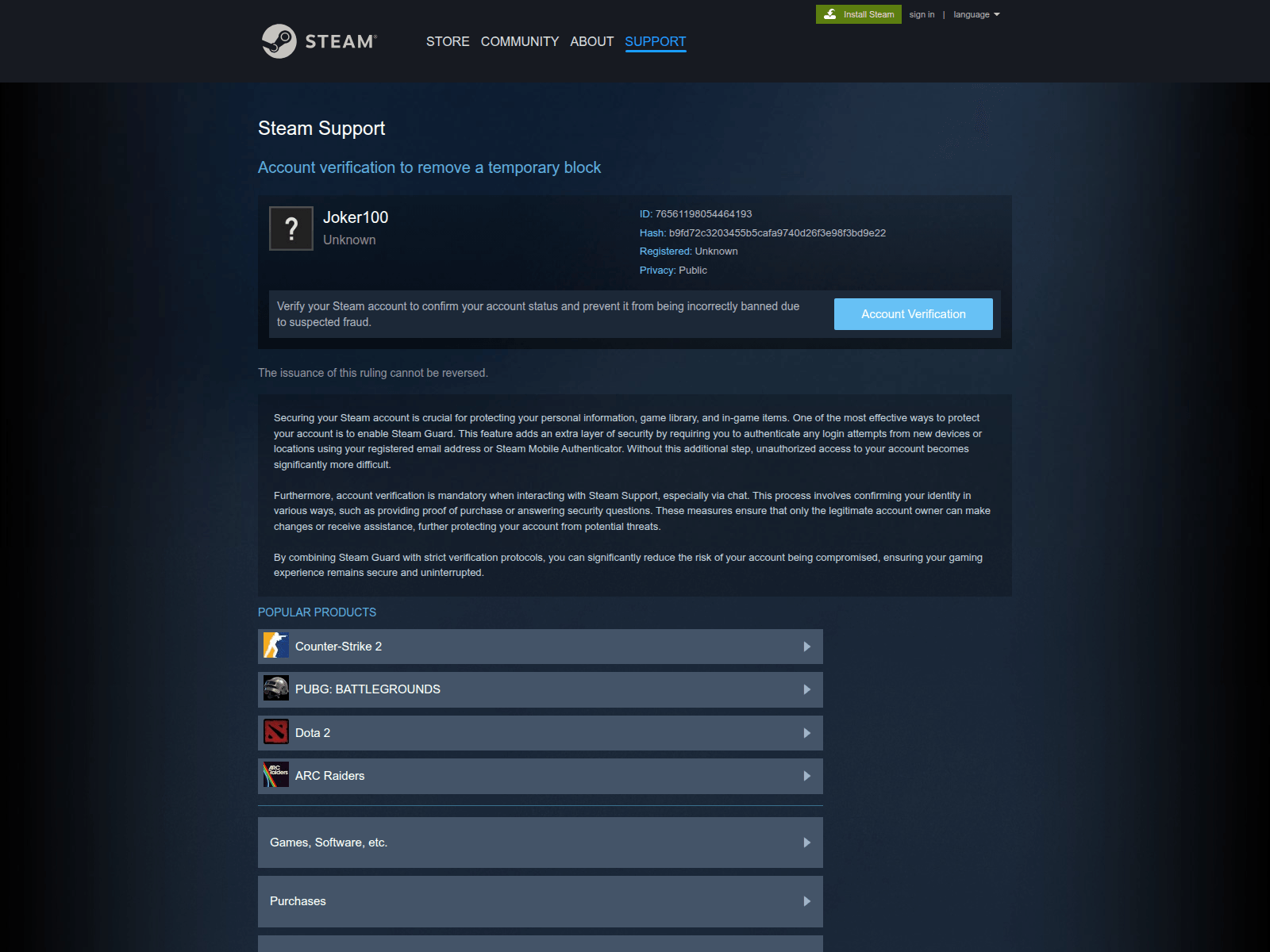
Steam support layout and temporary block notice
The page copies the exact visual design of the legitimate Steam platform, featuring a dark blue backdrop, top navigation bar, and Steam logo. At the top right, it shows links including "Install Steam" and "sign in", while the main section displays the headline "Steam Support" and a warning titled "Account verification to remove a temporary block". Inside this panel, a profile card for "Joker100" appears next to text that reads "Verify your Steam account to confirm your account status and prevent it from being incorrectly banned due to suspected fraud." A prominent blue button labeled "Account Verification" sits on the right side of this warning box. Below this panel, paragraphs discuss Steam Guard protocols, and a list of "Popular Products" including Counter-Strike 2, PUBG: BATTLEGROUNDS, and Dota 2 fills the lower part of the screen.
Domain registration timeline and infrastructure
Official Steam requests and account management take place exclusively on legitimate domains such as steampowered.com and steamcommunity.com rather than third-party addresses like valve.vacprotected.com. Because it was registered on 20 Nov 2026 and reported the same day, the hostname lacks any established history of legitimate operation. Furthermore, urlscan classified the page as malicious, providing an outside indicator that matches the suspicious characteristics of the address, while it sits behind Cloudflare, which hides the real server.
How to protect your Steam account
Never enter credentials or personal information in response to third-party verification prompts. Always navigate directly to steampowered.com to check your actual account status. Anyone who interacted with the verification button should log into the official platform immediately to change their password and check active sessions.
valve.vacprotected.com mimics Steam Support to warn of a temporary block, flagged by urlscan. Verify your account through official channels.
AI 요약
Steam support layout and temporary block notice The page copies the exact visual design of the legitimate Steam platform, featuring a dark blue backdrop, top navigation bar, and Steam logo. At the top right, it shows links including "Install Steam" and "sign in", while the main section displays the headline "Steam Support" and a warning titled "Account verification to remove a temporary block". Inside this panel, a profile card for "Joker100" appears next to text that reads "Verify your Steam account to confirm your account status and prevent it from being incorrectly banned due to suspected fraud." A prominent blue button labeled "Account Verification" sits on the right side of this warning box. Below this panel, paragraphs discuss Steam Guard protocols, and a list of "Popular Products" including Counter-Strike 2, PUBG: BATTLEGROUNDS, and Dota 2 fills the lower part of the screen. Domain registration timeline and infrastructure Official Steam requests and account management take place exclusively on legitimate domains such as steampowered.com and steamcommunity.com rather than third-party addresses like valve.vacprotected.com. Because it was registered on 20 Nov 2026 and reported the same day, the hostname lacks any established history of legitimate operation. Furthermore, urlscan classified the page as malicious, providing an outside indicator that matches the suspicious characteristics of the address, while it sits behind Cloudflare, which hides the real server. How to protect your Steam account Never enter credentials or personal information in response to third-party verification prompts. Always navigate directly to steampowered.com to check your actual account status. Anyone who interacted with the verification button should log into the official platform immediately to change their password and check active sessions.
Stored registration data identifies NameSilo as the registrar. PhishDestroy maintains separate registrar investigations; that broader material is contextual and is not an independent detection for this domain.
증거 레이어Availability: DNS inactiveContent: UnreachableDNS: NXDOMAIN
RDAP 등록
관측된 시간축last reachable: 2026-11-22 11:12 UTCcurrent episode first observed: 2026-11-24 06:03 UTCobserved RIP window: 2026-11-22 11:12 UTC → 2026-11-22 23:13 UTC · 12.03hmidpoint estimate ≈ 2026-11-22 17:13 UTC · precision medium · basis bounded
Availability, content, DNS and registration are independent evidence layers. NXDOMAIN, an unreachable origin or missing content alone does not prove registrar action. A registrar or provider is credited only when a direct technical marker identifies that actor. Report causality is shown separately.
등록된 하위 도메인1
도메인 레코드 또는 인증서 투명성(Certificate Transparency) 캐시에 저장된 호스트 이름. 호스트 이름만으로는 현재 가용성이나 악의적인 활동을 판단할 수 없습니다.
Open Graph 설명:Log in to your Steam account to get help with your Steam games, contact Steam Support, request refunds, and more. Help is also available if you can't log in, need to reset your password, or recover a hijacked account.
당신은 혼자가 아니며, 부끄러워할 일은 전혀 없습니다. 사기범은 신뢰를 악용하는 교묘한 범죄자입니다. 피해 사실을 신고하는 것은 사기에 맞서는 가장 강력한 무기입니다. 당신의 신고가 다른 사람의 피해를 막고 수사 기관의 대응을 도울 수 있습니다. 먼저 계정과 자금을 안전하게 보호한 후 신고하십시오. 계정 정보가 유출되었다면 즉시 신고하세요. 피해 복구를 빙자한 사기범에게 응하지 마세요.
실제로 취한 조치에 따라 대응하십시오. 비밀번호를 입력했다면, 해당 비밀번호와 이를 재사용한 모든 곳에서 비밀번호를 변경하십시오. 카드 정보를 결제하거나 제공했다면, 은행이나 결제 서비스 업체에 연락하십시오. 파일을 다운로드했다면, 기기를 바이러스 검사하십시오. 그런 다음 해당 사건을 신고하십시오.

 NameSilo
 188.114.97.3


 Microsoft
 Cloudflare
 Yandex
 ESET
 비트디펜더
 Norton
 Symantec
 Avira
 Avast / AVG
 카스퍼스키
 Dr.Web
 넷크래프트
 PhishTank
 APWG eCX
 PhishStats
 Phish.Report
 Spamhaus
 PolySwarm
 CheckPhish
 Quttera
 URLquery
 Criminal IP
 CRDF
 Scamadviser
 MyWOT