PhishDestroy first recorded aiwndd.com on 2026-10-09. Stored VirusTotal result: 4/92 engines flagged. Analysis time (as stored): 2026-10-21 02:00 UTC. Retrieved (as stored): 2026-10-21 04:40 UTC.
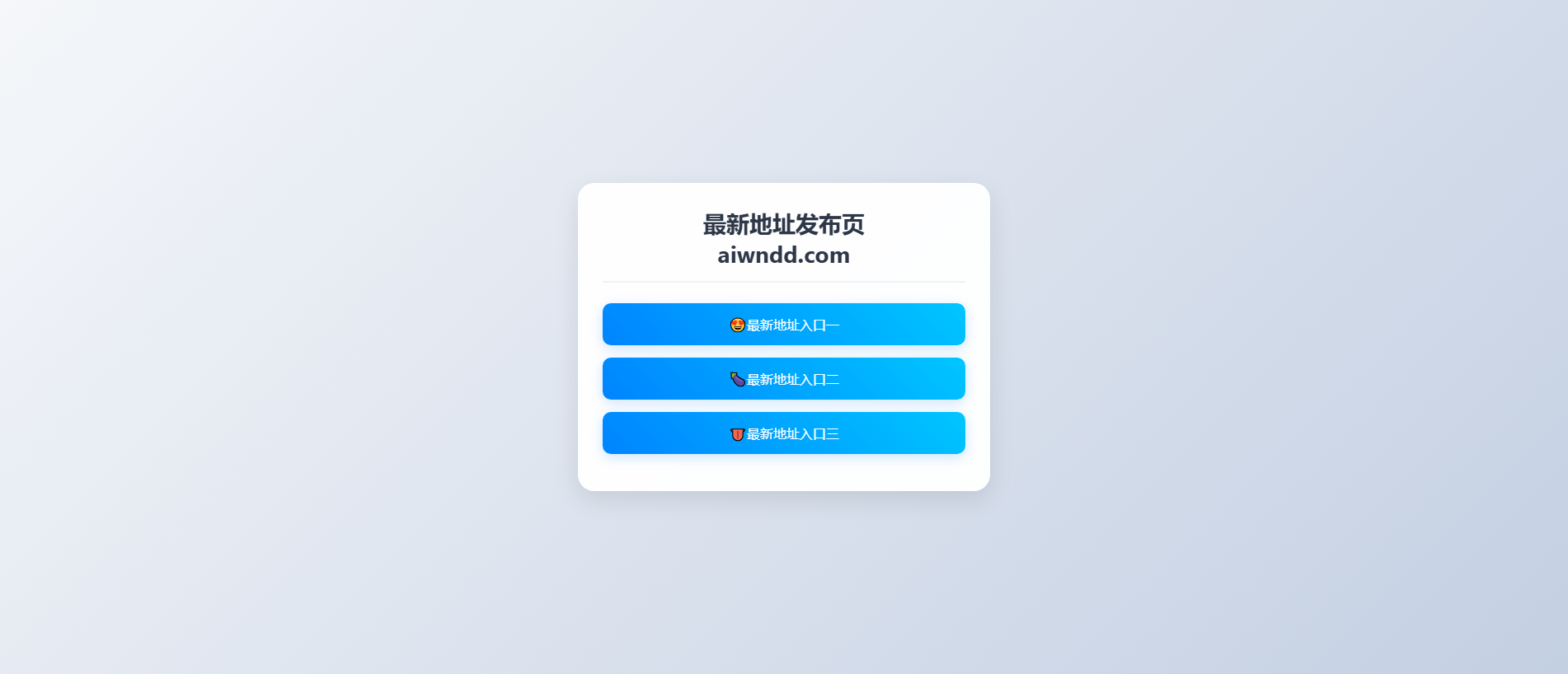
Page title: “91APP 最新地址发布页”
More about the sources
Recorded security signals
Stored VirusTotal result: 4/92 engines flagged. Analysis time (as stored): 2026-10-21 02:00 UTC. Retrieved (as stored): 2026-10-21 04:40 UTC. Use caution — do not enter credentials or personal information.
Expert view has every section: DNS, TLS, network requests, hashes and the raw JSON.
ABUSE NOTICE · 7D+ OPEN Outgoing abuse reports are recorded; the latest stored availability evidence still shows the domain reachable.
Notification and current-status evidence
The sent-report ledger records the first outgoing report at . The recorded recipient is rtr-security-threats@realtimeregister.com. The latest stored availability evidence still shows the domain reachable; 1 month has elapsed since the first outgoing report.
ICANN RAA §3.18 describes registrar abuse-contact and handling obligations. This section records outgoing timestamps, listed recipients, case identifiers, and later availability. It does not by itself prove receipt, acknowledgement, investigation, remediation, or contractual non-compliance.
Elapsed since first report
1 month
Reports sent
1
Latest case ID
PD-20261009-97A210
Current status
Observed active at latest stored check
Analysis
Domain summary
PhishDestroy first recorded aiwndd.com on 2026-10-09. Stored VirusTotal result: 4/92 engines flagged. Analysis time (as stored): 2026-10-21 02:00 UTC. Retrieved (as stored): 2026-10-21 04:40 UTC. Risk: critical (evidence score 81/100). Registrar: Realtime. Hosting: Cloudflare, Inc. PhishDestroy sent 1 abuse report. Do not enter credentials or connect a wallet.
aiwndd.com is an impersonation phishing page that presents itself as the 91APP "最新地址发布页", a "latest address publication page" that claims to point visitors to the current official 91APP address. It targets Chinese-speaking users who search for a working 91APP link and trust whatever portal claims to have it. PhishDestroy first flagged the domain on 2026-10-09. As of 2026-10-19 the site was still online and serving its content.
How the scam works
"Latest address" pages work by exploiting users who are used to official sites moving between domains. The page poses as the authoritative source for the brand's newest link. Visitors then follow it to look-alike login pages, fake app downloads or payment screens controlled by the operator. Victims can lose account credentials, any money they deposit, or the security of their device if they install a lookalike app. The page title shows a 91APP address-publication portal, while our classification treats the domain as an impersonation of that brand rather than a genuine distribution point.
Evidence
Detection is still thin. On 2026-10-17, VirusTotal showed 4 of 92 engines flagging the domain: CRDF, Forcepoint ThreatSeeker, SOCRadar and VIPRE. Those four independent vendors agree it is malicious, but most security products will not yet warn a visitor. The domain also appears in 4 AlienVault OTX threat pulses, which shows other researchers are tracking it. Among blocklists, it is currently listed by PhishDestroy.
Infrastructure
The domain was registered on 2026-07-29 through Realtime Register B.V., about ten weeks before PhishDestroy detected it. That gap fits a domain bought ahead of time and put into use later. Traffic runs through Cloudflare, Inc. on an address that geolocates to Canada, so the origin server stays hidden behind the proxy. The TLS certificate from Google Trust Services (WE1) means the browser padlock appears as normal, and it says nothing about whether the site is legitimate.
What to do
If you reached 91APP through this page, do not trust any link, download or login it offered. Get the brand's address only from its verified official channels. If you entered a password, change it at once, along with any other account that reuses it, and turn on two-factor authentication. If you installed an app from the page, remove it and scan the device. If you made a payment, contact your bank or payment provider right away. Defenders should block aiwndd.com at DNS and web proxies and watch for sibling "latest address" domains that use the same 91APP branding.
This is a separate stored result. Its counts, vendors and dates do not replace the provider observation above. A retrieval date is not an analysis date.
Open report Page code check by a separate monitor · 0 / 100 · 2026-10-09 10:20 UTC
This dated monitor analysis is separate from the primary PhishDestroy analysis above. A heuristic score is not a measured probability.
Heuristic score
0
Analyzed at
2026-10-09T10:20:07Z
Source timestamp
2026-10-09 12:20:07
Technical metadata
PhishDestroy narrative
Narrative generation metadata
Open report Title, description and generation record
The narrative generation date is separate from observation dates. These are the retained publication fields, not an additional independent detection.
AI title
aiwndd.com — 91APP Impersonation Phishing Page
AI description
aiwndd.com is an impersonation phishing page posing as a 91APP 'latest address' portal, targeting Chinese-speaking users looking for the 91APP site.
AI summary
Overview aiwndd.com is an impersonation phishing page that presents itself as the 91APP "最新地址发布页", a "latest address publication page" that claims to point visitors to the current official 91APP address. It targets Chinese-speaking users who search for a working 91APP link and trust whatever portal claims to have it. PhishDestroy first flagged the domain on 2026-10-09. As of 2026-10-19 the site was still online and serving its content. How the scam works "Latest address" pages work by exploiting users who are used to official sites moving between domains. The page poses as the authoritative source for the brand's newest link. Visitors then follow it to look-alike login pages, fake app downloads or payment screens controlled by the operator. Victims can lose account credentials, any money they deposit, or the security of their device if they install a lookalike app. The page title shows a 91APP address-publication portal, while our classification treats the domain as an impersonation of that brand rather than a genuine distribution point. Evidence Detection is still thin. On 2026-10-17, VirusTotal showed 4 of 92 engines flagging the domain: CRDF, Forcepoint ThreatSeeker, SOCRadar and VIPRE. Those four independent vendors agree it is malicious, but most security products will not yet warn a visitor. The domain also appears in 4 AlienVault OTX threat pulses, which shows other researchers are tracking it. Among blocklists, it is currently listed by PhishDestroy. Infrastructure The domain was registered on 2026-07-29 through Realtime Register B.V., about ten weeks before PhishDestroy detected it. That gap fits a domain bought ahead of time and put into use later. Traffic runs through Cloudflare, Inc. on an address that geolocates to Canada, so the origin server stays hidden behind the proxy. The TLS certificate from Google Trust Services (WE1) means the browser padlock appears as normal, and it says nothing about whether the site is legitimate. What to do If you reached 91APP through this page, do not trust any link, download or login it offered. Get the brand's address only from its verified official channels. If you entered a password, change it at once, along with any other account that reuses it, and turn on two-factor authentication. If you installed an app from the page, remove it and scan the device. If you made a payment, contact your bank or payment provider right away. Defenders should block aiwndd.com at DNS and web proxies and watch for sibling "latest address" domains that use the same 91APP branding. Useful links urlscan.io scan and screenshot: https://urlscan.io/result/01a11f5e-894e-76ff-9cac-2b84636736e5/ VirusTotal report: https://www.virustotal.com/gui/domain/aiwndd.com Google Safe Browsing status: https://transparencyreport.google.com/safe-browsing/search?url=aiwndd.com Archived copy: https://web.archive.org/web/20261009174011/https://aiwndd.com/ Report phishing to Google: https://safebrowsing.google.com/safebrowsing/report_phish/ Site owner? Request a review: https://phishdestroy.io/appeals/
According to Tranco this site has a low rank This website is (very) young.
The SSL certificate is valid This website is safe according to DNSFilter
Questions about aiwndd.com
Is aiwndd.com legit?
PhishDestroy rates aiwndd.com as critical risk (evidence score 81/100) from the recorded evidence; it was first recorded on 2026-10-09. Stored VirusTotal result: 4/92 engines flagged. Analysis time (as stored): 2026-10-21 02:00 UTC. Retrieved (as stored): 2026-10-21 04:40 UTC. The local score and a listing do not prove fraud. Check each source’s date and the exact URL.
Is aiwndd.com safe to connect a wallet?
Because of the risk signals above, do not connect a wallet, sign messages or approve token permissions on aiwndd.com. A confirmed blockchain transaction cannot be reversed.
What should I do if I used aiwndd.com?
Entered a password — change it on that service and on every other site where you used the same password
Turn on two-factor authentication — where the service offers it; an authenticator app is stronger than SMS codes
Paid or entered card or bank details — contact your bank or payment service through the contacts on your card or its official website
Connected a wallet but signed nothing — disconnect the site in the wallet and reject pending requests; a connection by itself does not move funds
Approved token spending (approve / permit) — revoke that approval with a token-approval checker
Shared a seed phrase or private key — move the remaining funds to a new wallet with a new seed phrase; the exposed wallet is no longer safe
Downloaded a file — do not open it and scan the device with security software
Keep the address, dates, payment or transaction details and messages for a report to the police or another competent authority. A report does not guarantee that money is returned. Step-by-step help: emergency guide.
Certificate fingerprint52f53a227f264df36e15b141d62c9b4e511975d8499cbe60f6b5f108ed7b7e19Certificate names · 2 SANs
aiwndd.com
*.aiwndd.com
Saved certificate metadata. Certificate dates without a timezone are shown as stored. Transport encryption does not establish that the site is trustworthy.
Network requests that the URLScan browser recorded while loading the page. URLScan does not provide a hash for every request. PhishDestroy retrieved this list on 2026-10-29 02:17 UTC.
Recorded events: 12. These records describe collected evidence, outgoing notifications and publication; they do not confirm a complete investigation or a takedown.
We scan suspicious URLs, inspect public results and send evidence through the appropriate abuse-reporting channels. The dated events above show what is recorded for this domain. The directory below explains the wider workflow.
01Public scans & evidence collection10 sources and tool groups
Inspect the public DNS, TLS, HTTP and technology surface.
02Abuse reports & follow-upRegistrar, hosting and security channels
Identify the responsible provider. Match registration and hosting records to the relevant abuse contact.
Prepare an evidence package. Include the URL, public scan references, captures and the recorded observations.
Send the report. Keep outgoing report records and recipient information when available.
Recheck and publish updates. Track later scanner verdicts, provider responses and site availability.
Security services used for scanning, reputation checks and reporting are listed below. A service being listed is not evidence that it received, accepted or acted on this particular domain. Recorded submissions appear in the notification history above.
Supporting signal — Shares a page feature, infrastructure or a collector label; not proof of one operator.
Discovery only — Same registrar or CDN edge: listed for navigation, not evidence of a link.
Each spoke is one reason a domain is linked to this report. Node size marks VirusTotal detections, dashed nodes are already offline, and the full lists follow below. Full list of related reports
Same automated brand label: Google8
Reports with the same collector label. A shared label does not establish impersonation or common ownership. View matching reports →
You are not alone and there is nothing to be ashamed of. Scammers are sophisticated criminals who exploit trust. Reporting your experience is the most powerful weapon against fraud — your report can prevent others from becoming victims and help law enforcement take action. Secure your accounts and funds first, then report. If credentials were compromised, report immediately. Do not engage with recovery scammers.
Act on what you actually did. Entered a password: change it, and wherever you reused it. Paid or gave card details: contact your bank or payment service. Downloaded a file: scan the device. Then report the incident.
Choose the steps that match what you shared. Keep a copy of this report alongside your own records.
What should I do immediately?
Urgent
Stop using the suspicious site. Open the real service through its official app or an address you already trust.
Entered a password — change it on that service and on every other site where you used the same password
Turn on two-factor authentication — where the service offers it; an authenticator app is stronger than SMS codes
Paid or entered card or bank details — contact your bank or payment service through the contacts on your card or its official website
Downloaded a file — do not open it and scan the device with security software
Shared a seed phrase or private key — move the remaining funds to a new wallet with a new seed phrase; the exposed wallet is no longer safe
Connected a wallet but signed nothing — disconnect the site in the wallet and reject pending requests; a connection by itself does not move funds
Approved token spending (approve / permit) — revoke that approval with a token-approval checker (revoke.cash)
Sent crypto — save the transaction hash, your address and the receiving address; blockchain transactions cannot be reversed
What information should I collect for my report?
FBI guidelines
Keep original emails, receipts, messages and screenshots in a secure place. A factual timeline helps the receiving authority understand what happened. IC3 evidence guidance ↗
Payment records — if you paid, save the receipt, amount, date, payment provider and recipient details.
Exact dates & times — of each transaction and first contact with scammer
Screenshots — scam website, chat messages, emails, wallet transactions, social media
All URLs & domains used by the scammer (including aiwndd.com)
Communications — emails, texts, phone numbers, usernames the scammer used
Even if you don't have all details — file a report anyway. Partial information still helps investigations.
Where should I report the scam?
FBI IC3 — Internet Crime Complaint Center (US federal reporting)
Your bank or payment provider — contact its fraud team promptly through official contact details if money or card information was exposed.
Local police — creates an official record, even if they can't act immediately
A report is not a guarantee of recovery or investigation, but prompt, accurate transaction data can help authorities and service providers trace the incident.
How do phishing scams typically work?
Fake websites — pixel-perfect clones of legitimate sites with slightly altered domains
Pig butchering — trust built over weeks via Telegram/WhatsApp/dating apps, then money stolen
Recovery scams — fraudsters pose as recovery agents and demand upfront fees. Never share a seed phrase or pay before independently verifying the provider
AI-powered scams — deepfakes, automated phishing, and AI-generated sites making fraud harder to detect
How can I protect myself in the future?
Bookmark official sites — never click links from emails, DMs, or ads
Verify domains — check on PhishDestroy before interacting. Check HTTPS, spelling, domain age
"Too good to be true" = scam — guaranteed returns, celebrity endorsements, urgent deadlines
Beware of recovery scammers! Recovery scammers may pose as investigators, lawyers, or tracing services. Do not pay upfront fees or disclose credentials.Learn more about recovery fraud →
About this reportSources, observation dates and corrections
This report combines saved page captures, registration and network records, scanner results and PhishDestroy reporting history. Each source keeps its own observation date. Open a source report to inspect the original result.
The AI-assisted analysis was written on . It describes the evidence available at that time; later source checks can change.
A capture documents what was shown. A scanner result records that provider’s assessment at the time of its check. Neither a valid certificate nor a zero-detection result is a guarantee of safety.

 Realtime
 172.67.200.188


 Microsoft
 Cloudflare
 Yandex
 ESET
 Bitdefender
 Norton
 Symantec
 Avira
 Avast / AVG
 Kaspersky
 Dr.Web
 Netcraft
 PhishTank
 APWG eCX
 PhishStats
 Phish.Report
 Spamhaus
 PolySwarm
 CheckPhish
 Quttera
 URLquery
 Criminal IP
 CRDF
 MyWOT