 TgWitness
Repository / docs/OPTIONAL-CAPTURE.md
Optional independent browser and AyuGram capture

Project · Installation and controls
Trusted Live (preview) adds an isolated official Telegram Desktop/Web session, native JSON import, guarded visual recording and an annotated continuity report. See setup, verification and qualification limits. It uses its own Linux runtime and Compose project; it is not enabled by the browser/AyuGram profiles below.
tgwitness-capture is an optional package with separate recorders. It doesn't touch
the main collector or its signed formats.
- More tools → Extras → Independent capture in the main panel, plus standalone English panels.
- Own processes, volumes, Ed25519 keys, sessions and exports.
- Capture is off at every start; video is a separate switch, also off.
- Chromium: PNG, MHTML and text snapshots of the selected tab, polling for changes.
- AyuGram: consistent copies of the local SQLite database (WAL included).
- Signed event chain, checkpoints, witness receipts, signed ZIP with an HTML report, standalone verifier.
Use the capture-browser and capture-ayugram profiles in
addons/capture/compose.yaml or install the package in
its own venv. A plain docker compose up starts neither. Panel connections are off by
default. An admin saves the recorder URL, control token and key fingerprint (get it
yourself, don't trust the network), then hits Check recorder. Tokens are encrypted
in the workspace vault and never come back through the API.
From the panel you can pick a tab, set options, start/pause, take a snapshot, see recent events and download checkpoints and the signed ZIP. The panel checks the pinned key before every command and verifies the whole export before handing it over. Closing the panel or disabling the connection doesn't stop a recorder, so pause it first. Recorders always restart paused.
Connect from the main panel#
Native install: start the recorders per the installation guide,
then use http://127.0.0.1:8791 (browser) and http://127.0.0.1:8792 (AyuGram). Another
host needs HTTPS with a valid certificate. Plain origins only, no paths, query strings or
credentials, redirects refused. These requests go straight to the recorder, not through the
main Connection settings.
Get control-token.txt and the SHA-256 key fingerprint from the recorder panel or
python -m tgwitness_capture identity --data /data over a trusted local connection. In
More tools → Extras → Independent capture enter both plus the API origin, enable control, save and
Check recorder. The optional client-screen link opens Neko or your own remote desktop;
type Telegram codes there yourself while capture is paused.
Everything in Docker (set up the proxy, Neko passwords and AyuGram mount first):
docker compose --project-directory . -f compose.yaml -f addons/capture/compose.yaml -f deploy/compose/compose.capture-panel.yaml --profile capture-browser --profile capture-ayugram up -d --build
Drop a profile if you need only one recorder. Existing volume names stay. In the panel use
http://capture-browser:8791 and http://capture-ayugram:8792 (localhost inside the
container is not the sidecar). Neko is at http://127.0.0.1:8081 locally. No Docker socket
is mounted into the main panel.
The panel takes exports up to 512 MiB with a two-minute deadline, bigger ones go through
the recorder panel. ZIPs keep the recorder's signature and include report.html; they're
not imported into the Telegram journal. The main journal records control actions and
verified export boundaries, never tokens or content. Note: one admin controls both
recorders, separate keys don't make them independent operators.
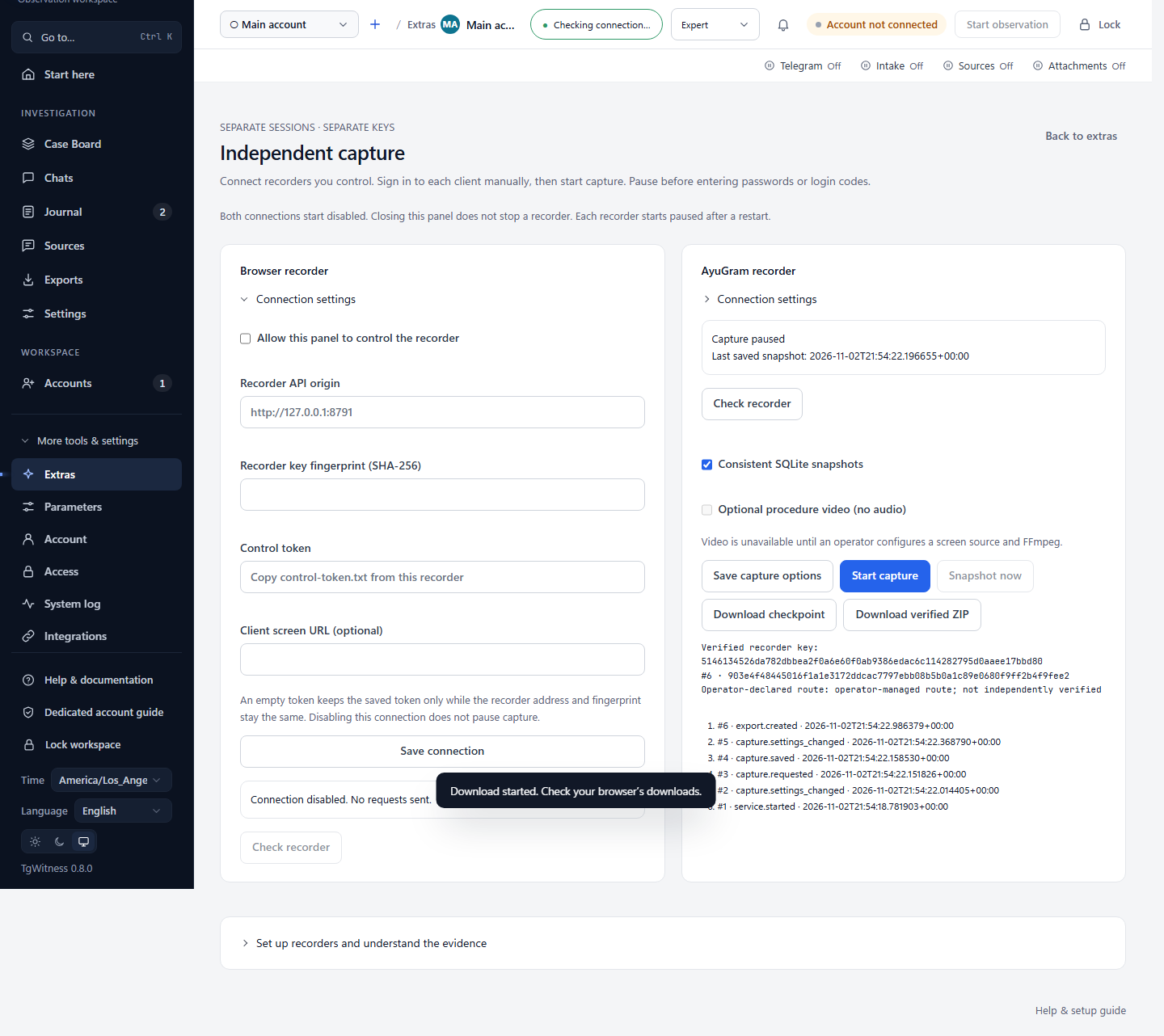
The browser profile includes optional Neko/Chromium and upstream proxy forwarding. AyuGram's GUI, login and proxy/WARP have to be set up already; the profile only runs the database recorder.
python -m tgwitness_capture ayugram reads AyuGram database copies afterwards: deleted
messages and earlier versions of edited ones. Rows removed between copies and a replaced
(rotated) database are signed into the recorder's journal. Against a TgWitness evidence ZIP,
each row is matched, AyuGram only, TgWitness only, conflict, or ambiguous (a negative chat ID
the journal can't resolve). The AyuGram file can be edited locally, has local-clock dates and
unsigned rows, and keeps no media of deleted messages and only messages loaded in memory, so a
row is a second, unsigned observation. The parser was tested with databases written by AyuGram
Desktop's storage definition, not with a running client. See
AyuGram database interpretation.
Preview. Isolation assumptions, video, key pinning, checkpoints, storage limits and the Linux acceptance steps are in the installation guide. Not implemented yet: WACZ/rrweb, signed PDF, automatic journal import.