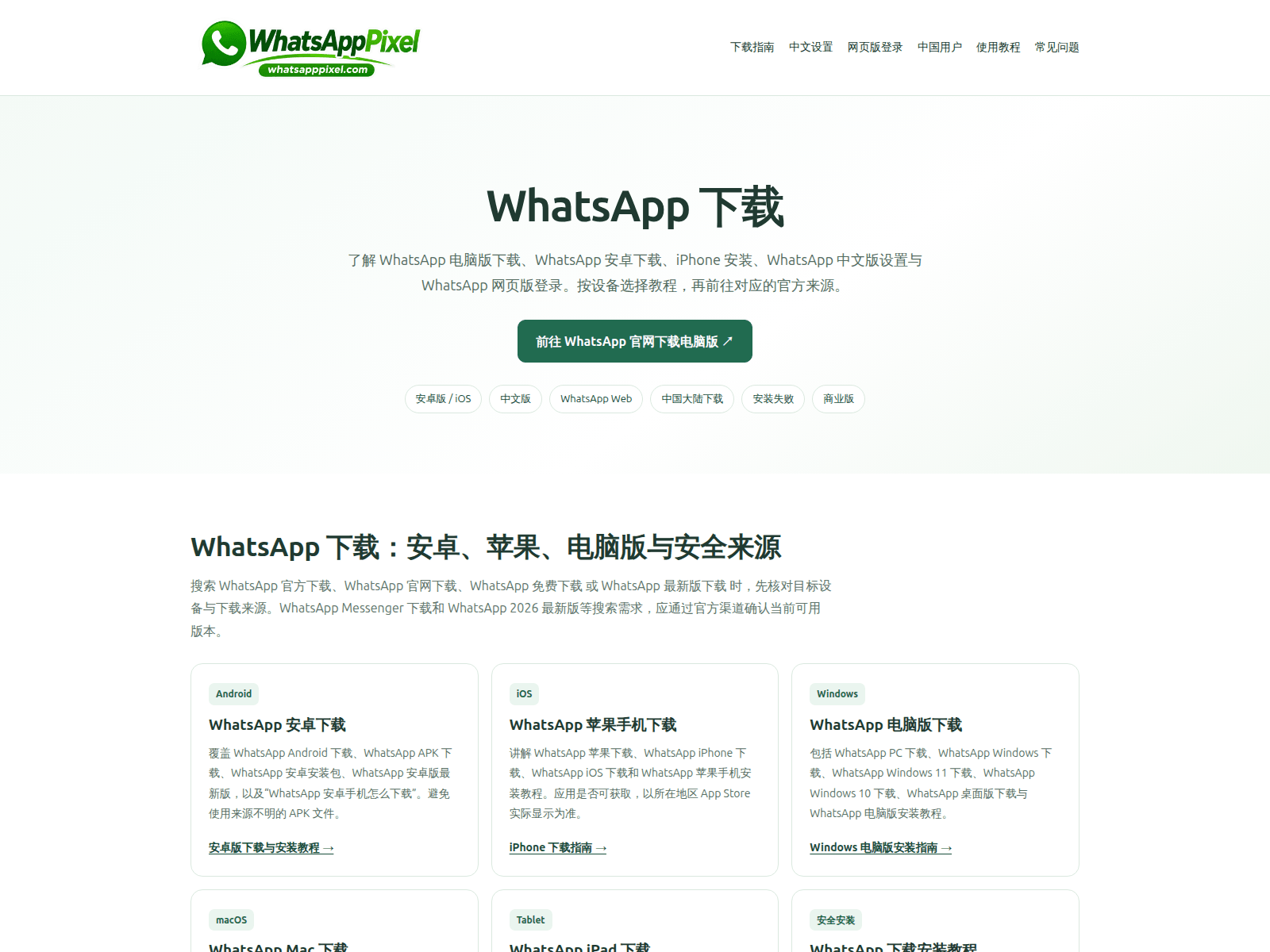
This site presents a Chinese-language WhatsApp software download guide featuring links for various operating systems. Visitors should avoid downloading third-party installers from unverified domains and use official channels instead.
분석 내용은 영어로만 제공됩니다.
페이지 제목: “WhatsApp 下载 - 电脑版、安卓版、中文版与网页版使用指南 | WhatsAppPixel”
출처에 대한 자세한 정보
저장된 보안 신호
저장된 VirusTotal 결과: 3/92 엔진에서 경고했습니다. 악성: 2. 의심: 1. 분석 시간(저장된 표기): 2026-11-21 02:26 UTC. 조회 시간(저장된 표기): 2026-11-22 10:36 UTC. 극도의 주의를 기울이십시오 — 자격 증명이나 개인 정보를 입력하지 마십시오.
URLScan 캡처 · 2026-11-22 10:33 UTC · SHA-256 c9c85d89…3067023
PhishDestroy 분석, 검토 완료된 버전
원본 포렌식 기록을 보존하기 위해 아래의 상세 PhishDestroy AI 분석은 영어로 유지됩니다.
Visual layout and software download structure
The page opens with a green-and-white header bearing the WhatsApp brand name and the domain name whatsapppixel.com inside a pill-shaped badge. Top navigation links feature Chinese labels pointing to download guides, settings, web login, and FAQs. A large central heading reads "WhatsApp 下载" accompanied by descriptive text directing users to desktop, Android, and web versions. A prominent button labeled "前往 WhatsApp 官网下载电脑版" sits above category filters for Android, iOS, web, and troubleshooting. Below the fold, three structured cards for Android, iOS, and Windows present instructions and internal links for acquiring installers.
Registration timeline and security context
It was registered on 19 Nov 2026, 3 days before it was first reported, presenting a notable discrepancy for a portal styling itself as a comprehensive download directory. 3 of 92 engines on VirusTotal flagged it on 21 Nov 2026, with Gridinsoft, Seclookup and alphaMountain.ai among the reporting engines, confirming that multiple independent scanners track the address was still reachable on 22 Nov 2026 at 11:34 UTC. Visitors encountering software distribution pages on newly established addresses should remain cautious regarding the safety of any provided installation files.
Recommended precautions
Users looking for official installers should obtain them exclusively from whatsapp.com rather than third-party distribution hubs like whatsapppixel.com. Anyone who has already downloaded and executed an installer from this page should immediately run a thorough malware scan, disconnect their device from the network, and inspect installed applications for unexpected modifications.
whatsapppixel.com mimics a WhatsApp download page with software categories, flagged by 3 VirusTotal engines, and unverified setup links.
AI 요약
Visual layout and software download structure The page opens with a green-and-white header bearing the WhatsApp brand name and the domain name whatsapppixel.com inside a pill-shaped badge. Top navigation links feature Chinese labels pointing to download guides, settings, web login, and FAQs. A large central heading reads "WhatsApp 下载" accompanied by descriptive text directing users to desktop, Android, and web versions. A prominent button labeled "前往 WhatsApp 官网下载电脑版" sits above category filters for Android, iOS, web, and troubleshooting. Below the fold, three structured cards for Android, iOS, and Windows present instructions and internal links for acquiring installers. Registration timeline and security context It was registered on 19 Nov 2026, 3 days before it was first reported, presenting a notable discrepancy for a portal styling itself as a comprehensive download directory. 3 of 92 engines on VirusTotal flagged it on 21 Nov 2026, with Gridinsoft, Seclookup and alphaMountain.ai among the reporting engines, confirming that multiple independent scanners track the address was still reachable on 22 Nov 2026 at 11:34 UTC. Visitors encountering software distribution pages on newly established addresses should remain cautious regarding the safety of any provided installation files. Recommended precautions Users looking for official installers should obtain them exclusively from whatsapp.com rather than third-party distribution hubs like whatsapppixel.com. Anyone who has already downloaded and executed an installer from this page should immediately run a thorough malware scan, disconnect their device from the network, and inspect installed applications for unexpected modifications.
Headers: Server: cloudflare; Content type: text/html; Strict transport security: max-age=31536000
whatsapppixel.com 관련 질문
whatsapppixel.com은(는) 정상적인 사이트인가요?
PhishDestroy는 기록된 증거를 바탕으로 whatsapppixel.com를 심각 위험 등급(증거 점수 73/100)으로 평가했으며, 이는 2026-11-22에 처음 기록되었습니다. 저장된 VirusTotal 결과: 3/92 엔진에서 경고했습니다. 악성: 2. 의심: 1. 분석 시간(저장된 표기): 2026-11-21 02:26 UTC. 조회 시간(저장된 표기): 2026-11-22 10:36 UTC. 자체 점수와 목록 등재만으로 사기가 입증되지는 않습니다. 각 출처의 날짜와 정확한 URL을 확인하세요.
whatsapppixel.com에 지갑을 연결해도 안전한가요?
앞서 언급된 위험 신호로 인해, 해당 사이트에서 지갑을 연결하거나 메시지에 서명하거나 토큰 권한을 approve하지 마십시오. 확인된 블록체인 거래는 되돌릴 수 없습니다.
whatsapppixel.com을(를) 이용했다면 어떻게 해야 하나요?
비밀번호를 입력했습니다 — 해당 서비스와 동일한 비밀번호를 사용한 다른 모든 사이트에서 비밀번호를 변경하세요.
2단계 인증을 켜세요 — 해당 서비스가 지원하는 경우, 인증 앱은 SMS 코드보다 보안성이 더 높습니다.
카드 또는 은행 정보를 결제하거나 입력했습니다. — 카드에 기재된 연락처나 공식 웹사이트를 통해 이용 중인 은행이나 결제 서비스 업체에 문의하십시오.
지갑을 연결했지만 아무것도 서명하지 않았습니다 — 지갑에서 해당 사이트를 연결 해제하고 보류 중인 요청을 거부하십시오. 연결만으로는 자금이 이체되지 않습니다.
토큰 지출 승인 (approve / permit) — 토큰 승인 검사기를 사용하여 해당 승인을 취소합니다
시드 문구나 개인 키를 공유했습니다 — 남은 자금을 새로운 시드 문구가 있는 새 지갑으로 옮기세요. 보안이 노출된 지갑은 더 이상 안전하지 않습니다.
파일을 다운로드했습니다 — 파일을 열지 말고 보안 소프트웨어로 기기를 검사하십시오.
경찰이나 기타 관할 기관에 신고할 때를 대비해 주소, 날짜, 결제 또는 거래 내역, 메시지 등을 잘 보관해 두십시오. 신고한다고 해서 반드시 돈이 돌려받는다는 보장은 없습니다. 단계별 안내: 긴급 대응 가이드.
1차 평가 변수활성 콘텐츠reason: Ordinary HTTP content served90% confidence
출처source: Current Http Probe
증거 레이어Availability: Content servingContent: Content served at rootDNS: Stale
최신 HTTP 관측 결과활성 콘텐츠일반 HTTP 콘텐츠 제공90%2026-11-22 12:12 UTC
RDAP 등록
관측된 시간축last reachable: 2026-11-22 12:12 UTClast content: 2026-11-22 12:12 UTC
Availability, content, DNS and registration are independent evidence layers. NXDOMAIN, an unreachable origin or missing content alone does not prove registrar action. A registrar or provider is credited only when a direct technical marker identifies that actor. Report causality is shown separately.
등록된 하위 도메인1
도메인 레코드 또는 인증서 투명성(Certificate Transparency) 캐시에 저장된 호스트 이름. 호스트 이름만으로는 현재 가용성이나 악의적인 활동을 판단할 수 없습니다.
당신은 혼자가 아니며, 부끄러워할 일은 전혀 없습니다. 사기범은 신뢰를 악용하는 교묘한 범죄자입니다. 피해 사실을 신고하는 것은 사기에 맞서는 가장 강력한 무기입니다. 당신의 신고가 다른 사람의 피해를 막고 수사 기관의 대응을 도울 수 있습니다. 먼저 계정과 자금을 안전하게 보호한 후 신고하십시오. 계정 정보가 유출되었다면 즉시 신고하세요. 피해 복구를 빙자한 사기범에게 응하지 마세요.
실제로 취한 조치에 따라 대응하십시오. 비밀번호를 입력했다면, 해당 비밀번호와 이를 재사용한 모든 곳에서 비밀번호를 변경하십시오. 카드 정보를 결제하거나 제공했다면, 은행이나 결제 서비스 업체에 연락하십시오. 파일을 다운로드했다면, 기기를 바이러스 검사하십시오. 그런 다음 해당 사건을 신고하십시오.


 188.114.97.3


 Microsoft
 Cloudflare
 Yandex
 ESET
 비트디펜더
 Norton
 Symantec
 Avira
 Avast / AVG
 카스퍼스키
 Dr.Web
 넷크래프트
 PhishTank
 APWG eCX
 PhishStats
 Phish.Report
 Spamhaus
 PolySwarm
 CheckPhish
 Quttera
 Criminal IP
 CRDF
 Scamadviser
 MyWOT