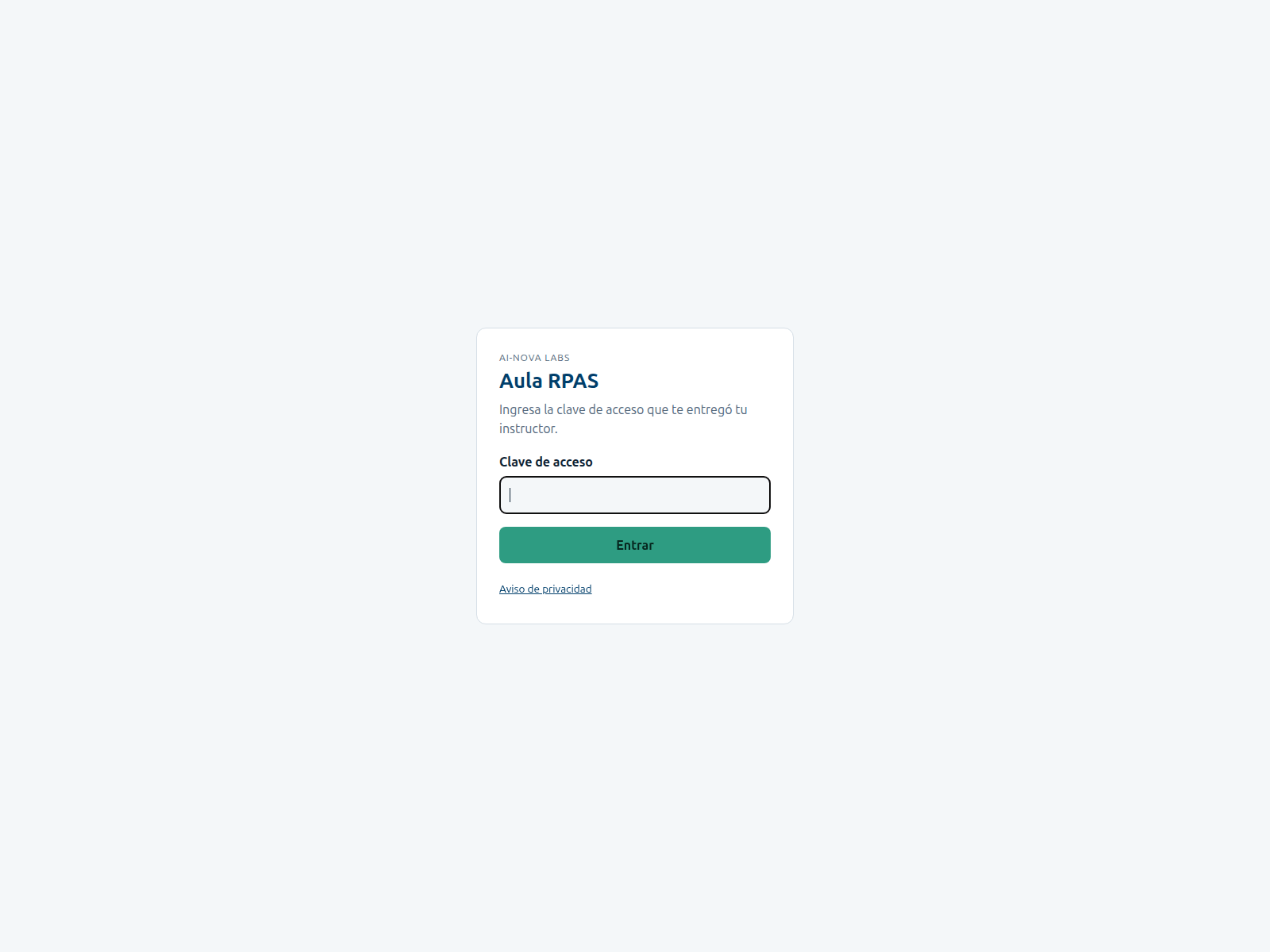
The page at cursosrpas.cl displays an Aula RPAS login portal from AI-Nova Labs that requests an access key provided by an instructor. Anyone who entered a password on this page should change their credentials across other accounts immediately.
Page title: “Acceso · Aula RPAS”
More about the sources
Recorded security signals
Stored VirusTotal result: 2/92 engines flagged. Analysis time (as stored): 2026-11-26 04:19 UTC. Retrieved (as stored): 2026-11-26 14:15 UTC. Use caution — do not enter credentials or personal information.
PhishDestroy first recorded cursosrpas.cl on 2026-11-26. Stored VirusTotal result: 2/92 engines flagged. Analysis time (as stored): 2026-11-26 04:19 UTC. Retrieved (as stored): 2026-11-26 14:15 UTC. Risk: critical (evidence score 71/100). Registrar: NIC Chile. Status: Last known active. Hosting: Amazon.com, Inc. Do not enter credentials or connect a wallet.
The page at cursosrpas.cl opens with a clean, centered card set against a pale background, carrying the small heading "AI-Nova Labs" above the main title "Aula RPAS". Below this heading, Spanish instructional text reads "Ingresa la clave de acceso que te entregó tu instructor." A single text field is labeled "Clave de acceso" to collect the user's password, accompanied by a green "Entrar" button to submit the input. A small privacy policy link marked "Aviso de privacidad" sits quietly at the bottom of the card. The interface functions solely as an authentication gate for a course system, prompting visitors to input credentials supplied externally.
Password collection and security analysis
The primary mechanism of the page is a password field designed to capture user authentication keys under the guise of an educational platform login. Because 2 of 92 VirusTotal engines flagged it on 26 Nov 2026, with Gridinsoft and SOCRadar among them, security analysts recognize this form as a credential harvesting risk. Furthermore, it was registered on 25 Nov 2026 and reported the same day.
Recommended actions for visitors
Visitors who have already entered a password into the form should immediately modify their credentials on any other platform where the same password or variation was used. Because the site relies on fresh registration through NIC Chile, verifying the legitimacy of training portals directly through official institutional channels remains essential before submitting any access codes.
What to do right now
Pick what happened and tick the steps as you go. The ticks are kept only in this browser.
This is a separate stored result. Its counts, vendors and dates do not replace the provider observation above. A retrieval date is not an analysis date.
Source
VirusTotal
Result state
observed
Numerator
2
Denominator
92
Vendors
Gridinsoft, SOCRadar
Observed at
2026-11-26 04:19:29
Checked at
2026-11-26 15:16:00
Fetched at
2026-11-26 14:16:00
Cloudflare Radar
Suspicious
Open report Cloudflare RadarOriginal source recordObserved: 13 fields
The page requests a password via an "Aula RPAS" interface, but 2 of 92 VirusTotal engines flagged it on 26 Nov 2026. Users should confirm course links directly with their instructors rather than trusting unfamiliar addresses.
What happens if I entered my password on cursosrpas.cl?
Entering your access key exposes your credentials to whoever controls the server. If you reused that password elsewhere, update those accounts immediately to prevent unauthorized access.
Why does the site ask for an instructor key?
The interface displays Spanish text stating "Ingresa la clave de acceso que te entregó tu instructor" to mimic a restricted educational login portal. Collecting these keys allows operators to harvest valid credentials.
Edge-IP reputation is not attributed to this domain.
Nameservers 2
ns1.vercel-dns.com
ns2.vercel-dns.com
SOA
nsname: ns1.vercel-dns.com
hostmaster: hostmaster.nsone.net
serial: 1795659662
refresh: 43200
retry: 7200
expire: 1209600
minttl: 600
Location describes the IP network.
TLS certificate
Issuer
YR2
Valid from
2026-11-26 11:50:15
Valid until
2027-02-24 11:50:14
Hostname match
Yes
Validity
Within stored validity dates
Collection source
PhishDestroy collector
Certificate fingerprint845b25eb1f0b599faa068d1cfc09901cfc8ea51c0fd48359cded6775d73d4794Certificate names · 2 SANs
*.cursosrpas.cl
cursosrpas.cl
Saved certificate metadata. Certificate dates without a timezone are shown as stored. Transport encryption does not establish that the site is trustworthy.
Evidence layersAvailability: Content servingContent: Content served at rootDNS: Resolved
Latest HTTP observationLive contentOrdinary HTTP content served90%2026-11-28 11:15 UTC
RDAP registration
Observed timelinelast reachable: 2026-11-28 11:15 UTClast content: 2026-11-28 11:15 UTC
Availability, content, DNS and registration are independent evidence layers. NXDOMAIN, an unreachable origin or missing content alone does not prove registrar action. A registrar or provider is credited only when a direct technical marker identifies that actor. Report causality is shown separately.
Recorded subdomains2
Hostnames retained in the domain record or Certificate Transparency cache. A hostname alone does not establish current availability or malicious activity.
enel.cursosrpas.clDomain record
www.cursosrpas.clDomain record
Technologies · 2 identified
V
Vercel
PaaS
Vercel is a cloud platform for static frontends and serverless functions.
Network requests that the URLScan browser recorded while loading the page. URLScan does not provide a hash for every request. PhishDestroy retrieved this list on 2026-11-26 14:10 UTC.
Recorded events: 8. These records describe collected evidence, outgoing notifications and publication; they do not confirm a complete investigation or a takedown.
The domain remains reachable or access-restricted; future checks may update this observation.
ongoing
Recorded activity
3 entries
Lifecycle
VirusTotal analysis with detections
Added to PhishDestroy+9 h 50 min
Added to PhishDestroy
cursosrpas.cl
same minute
URLScan
Page captured
+9 h 50 min
VirusTotal
2/92 engine detections
How we investigate & report
Public scans, evidence and abuse channels
We scan suspicious URLs, inspect public results and send evidence through the appropriate abuse-reporting channels. The dated events above show what is recorded for this domain. The directory below explains the wider workflow.
01Public scans & evidence collection10 sources and tool groups
Inspect the public DNS, TLS, HTTP and technology surface.
02Abuse reports & follow-upRegistrar, hosting and security channels
Identify the responsible provider. Match registration and hosting records to the relevant abuse contact.
Prepare an evidence package. Include the URL, public scan references, captures and the recorded observations.
Send the report. Keep outgoing report records and recipient information when available.
Recheck and publish updates. Track later scanner verdicts, provider responses and site availability.
Security services used for scanning, reputation checks and reporting are listed below. A service being listed is not evidence that it received, accepted or acted on this particular domain. Recorded submissions appear in the notification history above.
You are not alone and there is nothing to be ashamed of. Scammers are sophisticated criminals who exploit trust. Reporting your experience is the most powerful weapon against fraud — your report can prevent others from becoming victims and help law enforcement take action. Secure your accounts and funds first, then report. If credentials were compromised, report immediately. Do not engage with recovery scammers.
Act on what you actually did. Entered a password: change it, and wherever you reused it. Paid or gave card details: contact your bank or payment service. Downloaded a file: scan the device. Then report the incident.
Choose the steps that match what you shared. Keep a copy of this report alongside your own records.
What should I do immediately?
Urgent
Stop using the suspicious site. Open the real service through its official app or an address you already trust.
Entered a password — change it on that service and on every other site where you used the same password
Turn on two-factor authentication — where the service offers it; an authenticator app is stronger than SMS codes
Paid or entered card or bank details — contact your bank or payment service through the contacts on your card or its official website
Downloaded a file — do not open it and scan the device with security software
Shared a seed phrase or private key — move the remaining funds to a new wallet with a new seed phrase; the exposed wallet is no longer safe
Connected a wallet but signed nothing — disconnect the site in the wallet and reject pending requests; a connection by itself does not move funds
Approved token spending (approve / permit) — revoke that approval with a token-approval checker (revoke.cash)
Sent crypto — save the transaction hash, your address and the receiving address; blockchain transactions cannot be reversed
What information should I collect for my report?
FBI guidelines
Keep original emails, receipts, messages and screenshots in a secure place. A factual timeline helps the receiving authority understand what happened. IC3 evidence guidance ↗
Payment records — if you paid, save the receipt, amount, date, payment provider and recipient details.
Exact dates & times — of each transaction and first contact with scammer
Screenshots — scam website, chat messages, emails, wallet transactions, social media
All URLs & domains used by the scammer (including cursosrpas.cl)
Communications — emails, texts, phone numbers, usernames the scammer used
Even if you don't have all details — file a report anyway. Partial information still helps investigations.
Where should I report the scam?
FBI IC3 — Internet Crime Complaint Center (US federal reporting)
Your bank or payment provider — contact its fraud team promptly through official contact details if money or card information was exposed.
Local police — creates an official record, even if they can't act immediately
A report is not a guarantee of recovery or investigation, but prompt, accurate transaction data can help authorities and service providers trace the incident.
How do phishing scams typically work?
Fake websites — pixel-perfect clones of legitimate sites with slightly altered domains
Pig butchering — trust built over weeks via Telegram/WhatsApp/dating apps, then money stolen
Recovery scams — fraudsters pose as recovery agents and demand upfront fees. Never share a seed phrase or pay before independently verifying the provider
AI-powered scams — deepfakes, automated phishing, and AI-generated sites making fraud harder to detect
How can I protect myself in the future?
Bookmark official sites — never click links from emails, DMs, or ads
Verify domains — check on PhishDestroy before interacting. Check HTTPS, spelling, domain age
"Too good to be true" = scam — guaranteed returns, celebrity endorsements, urgent deadlines
Beware of recovery scammers! Recovery scammers may pose as investigators, lawyers, or tracing services. Do not pay upfront fees or disclose credentials.Learn more about recovery fraud →
About this reportSources, observation dates and corrections
This report combines saved page captures, registration and network records, scanner results and PhishDestroy reporting history. Each source keeps its own observation date. Open a source report to inspect the original result.
The AI-assisted analysis was written on . It describes the evidence available at that time; later source checks can change.
A capture documents what was shown. A scanner result records that provider’s assessment at the time of its check. Neither a valid certificate nor a zero-detection result is a guarantee of safety.

 64.29.17.65


 Microsoft
 Cloudflare
 Yandex
 ESET
 Bitdefender
 Norton
 Symantec
 Avira
 Avast / AVG
 Kaspersky
 Dr.Web
 Netcraft
 PhishTank
 APWG eCX
 PhishStats
 Phish.Report
 Spamhaus
 PolySwarm
 CheckPhish
 Quttera
 URLquery
 Criminal IP
 CRDF
 Scamadviser
 MyWOT