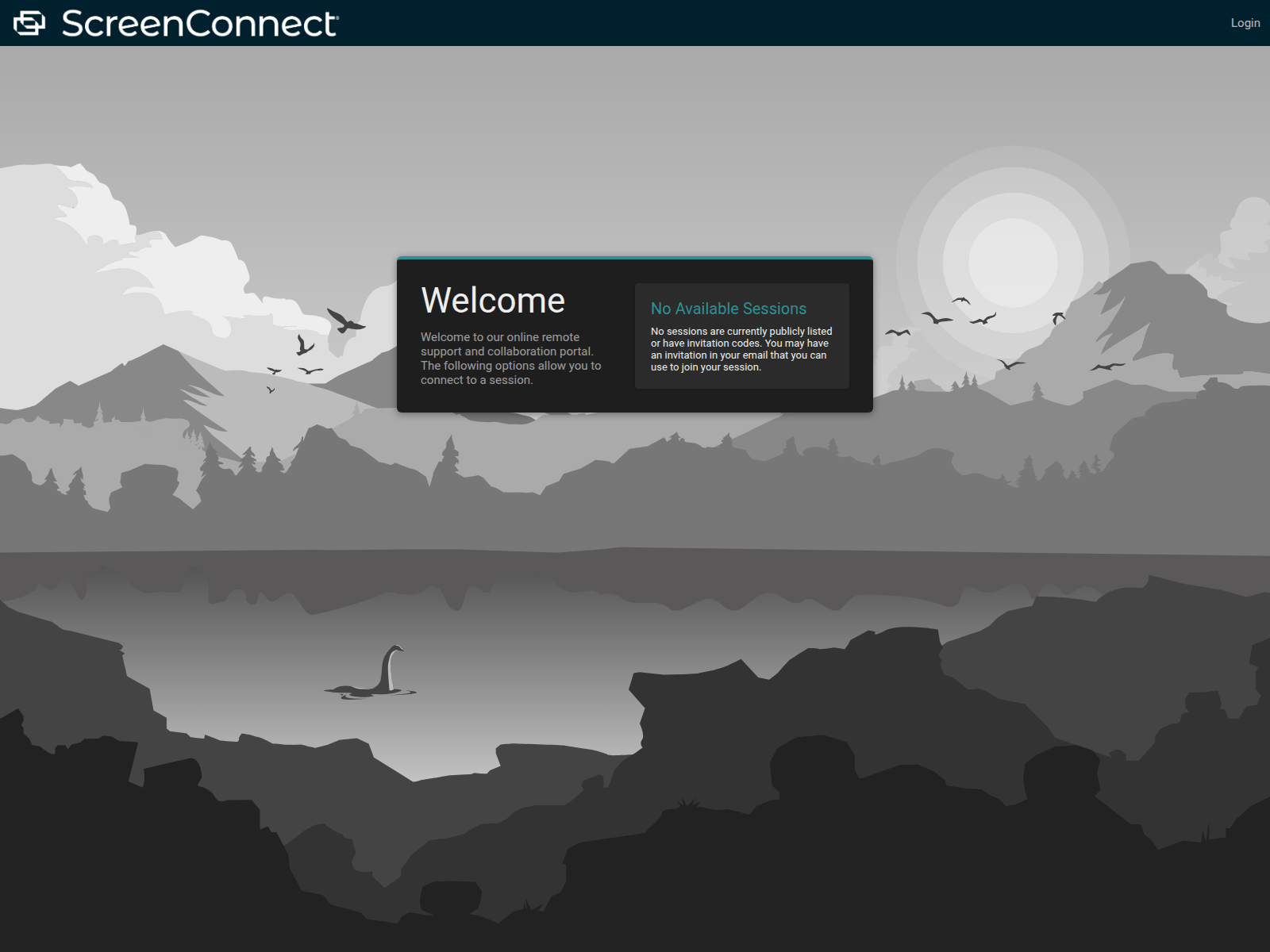
The getcares.icu page copies the ScreenConnect remote support interface to present an unverified login portal. If you visited this address or tried to log in, close the page immediately and check your real accounts.
URLScan截图 · 2026-11-21 16:02 UTC · SHA-256 55310bf6…a4a67f6
PhishDestroy分析,审阅版
为保留原始取证记录,下方的 PhishDestroy AI 详细分析仍使用英文。
ScreenConnect support portal layout on getcares.icu
The page at getcares.icu presents itself as a ScreenConnect remote support and collaboration portal against a landscape backdrop. The top left corner displays the "ScreenConnect" brand name, and the upper right features a "Login" button. A central dialog box reads "Welcome" alongside the text "Welcome to our online remote support and collaboration portal. The following options allow you to connect to a session." Right beside this, another box displays "No Available Sessions" with text noting that no sessions are publicly listed and visitors should use an invitation code from email. This design mimics official remote access deployment interfaces to make visitors feel they have arrived at a legitimate support portal.
Independent detections and security telemetry
Security analysts monitor this deployment because urlscan classified the page as malicious, and VirusTotal showed 4 of 92 engines flagging it on 16 Nov 2026, with Forcepoint ThreatSeeker, CRDF and Fortinet among the flagging vendors; its PhishDestroy evidence score is 45/100 (high). Furthermore, 153 other reported domains use the same nameserver pair, which links this address to a broader network of suspicious registrations sharing infrastructure.
Where this support portal copy leads
Pages mimicking remote management tools usually attempt to harvest user credentials or trick visitors into downloading unauthorized remote access software. Entering login details on such an unverified portal exposes your organization or personal environment to unauthorized access by whoever controls the domain.
Recommended precautions
Always verify that you are reaching out through official IT channels rather than clicking unverified links sent via email or chat. If you attempted to log in through getcares.icu, assume your credentials may have been compromised and immediately update your passwords on legitimate platforms.
getcares.icu — ScreenConnect remote support portal clone
AI 描述
getcares.icu presents a ScreenConnect support login portal and is flagged by urlscan and 4 VirusTotal engines. Avoid entering credentials.
AI摘要
ScreenConnect support portal layout on getcares.icu The page at getcares.icu presents itself as a ScreenConnect remote support and collaboration portal against a landscape backdrop. The top left corner displays the "ScreenConnect" brand name, and the upper right features a "Login" button. A central dialog box reads "Welcome" alongside the text "Welcome to our online remote support and collaboration portal. The following options allow you to connect to a session." Right beside this, another box displays "No Available Sessions" with text noting that no sessions are publicly listed and visitors should use an invitation code from email. This design mimics official remote access deployment interfaces to make visitors feel they have arrived at a legitimate support portal. Independent detections and security telemetry Security analysts monitor this deployment because urlscan classified the page as malicious, and VirusTotal showed 4 of 92 engines flagging it on 16 Nov 2026, with Forcepoint ThreatSeeker, CRDF and Fortinet among the flagging vendors; its PhishDestroy evidence score is 45/100 (high). Furthermore, 153 other reported domains use the same nameserver pair, which links this address to a broader network of suspicious registrations sharing infrastructure. Where this support portal copy leads Pages mimicking remote management tools usually attempt to harvest user credentials or trick visitors into downloading unauthorized remote access software. Entering login details on such an unverified portal exposes your organization or personal environment to unauthorized access by whoever controls the domain. Recommended precautions Always verify that you are reaching out through official IT channels rather than clicking unverified links sent via email or chat. If you attempted to log in through getcares.icu, assume your credentials may have been compromised and immediately update your passwords on legitimate platforms.
The linked repository preserves daily zone observations across seven ShortDot-operated TLDs, including registration volume and abuse-related indicators. This registry context is supporting background and is not an independent detection for the domain in this report.
Microsoft HTTPAPI is a kernel-mode HTTP driver in the Windows operating system responsible for handling HTTP requests and responses with efficiency, scalability, and security.

 PDR
 94.154.32.109


 Microsoft
 Cloudflare
 Yandex
 ESET
 Bitdefender
 Norton
 Symantec
 Avira
 Avast / AVG
 卡巴斯基
 Dr.Web
 Netcraft
 PhishTank
 APWG eCX
 PhishStats
 Phish.Report
 PolySwarm
 CheckPhish
 Quttera
 URLquery
 Criminal IP
 CRDF
 Scamadviser
 MyWOT