The go-ledger.at domain presents a fabricated newspaper article impersonating Ledger to encourage software downloads and credential theft. Anyone who downloaded files from this page should immediately check their devices for unauthorized applications and secure their hardware wallets.
분석 내용은 영어로만 제공됩니다.
페이지 제목: “Ledger Live : Download, Install and Use Guide | Sovereign Key”
출처에 대한 자세한 정보
저장된 보안 신호
저장된 VirusTotal 결과: 10/92 엔진에서 경고했습니다. 악성: 9. 의심: 1. 분석 시간(저장된 표기): 2026-11-21 17:45 UTC. 조회 시간(저장된 표기): 2026-11-22 15:34 UTC. 외부 차단 목록에 등재됨: MetaMask, SEAL. 극도의 주의를 기울이십시오 — 자격 증명이나 개인 정보를 입력하지 마십시오.
위험 신호
VirusTotal 탐지: 10/92저장된 차단 목록 일치 항목: 2젊은 도메인: 4일 전
URLScan 캡처 · 2026-11-22 15:30 UTC · SHA-256 959e254a…721f616
PhishDestroy 분석, 검토 완료된 버전
원본 포렌식 기록을 보존하기 위해 아래의 상세 PhishDestroy AI 분석은 영어로 유지됩니다.
The Sovereign Key Gazette review layout
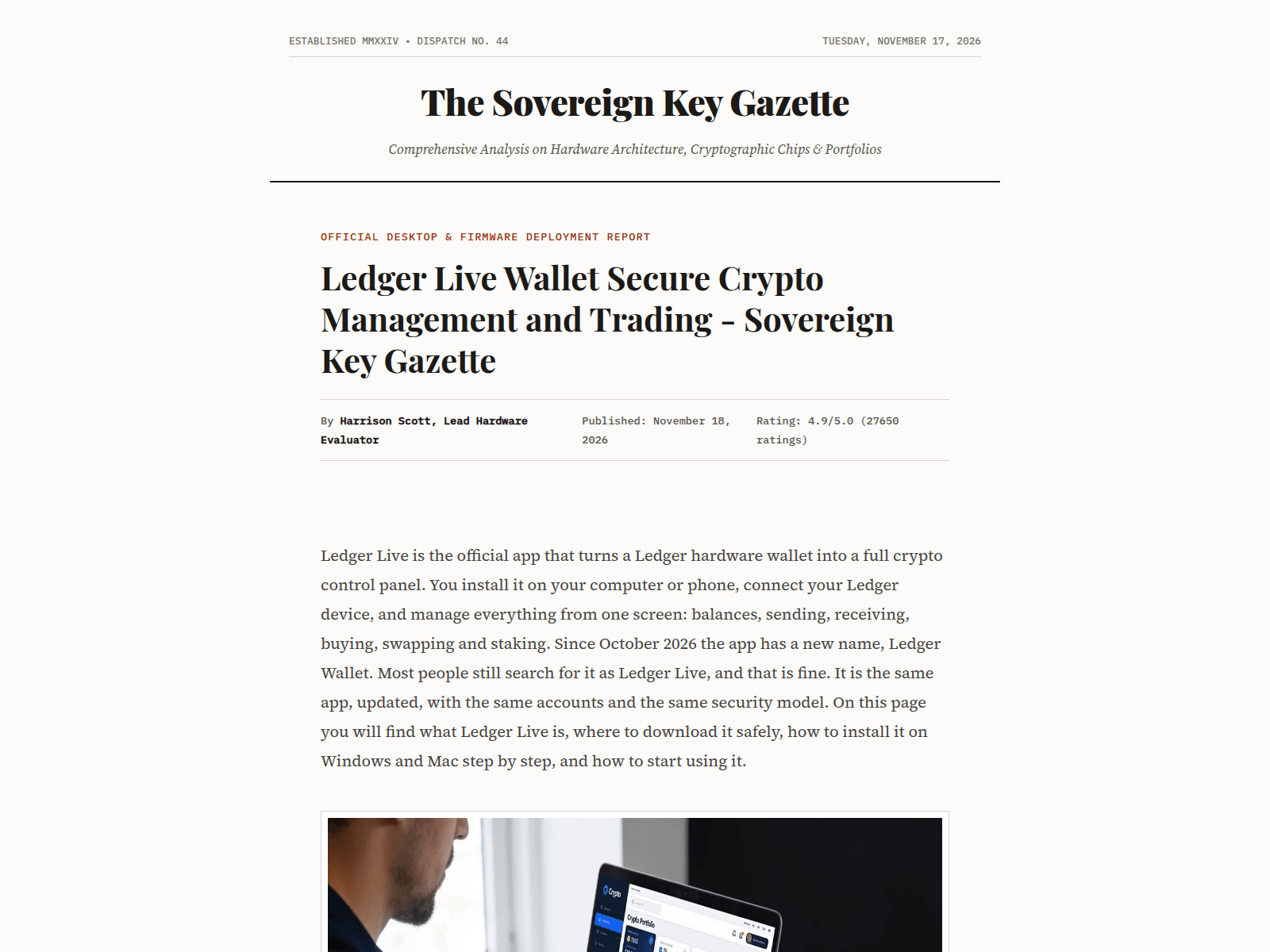
The page at go-ledger.at styles itself as an online newspaper titled "The Sovereign Key Gazette" featuring the headline "Ledger Live Wallet Secure Crypto Management and Trading – Sovereign Key Gazette". It lists an author named Harrison Scott, a publication date of November 18, 2026, and a rating of 4.9/5.0 with "(27650 ratings)". The body text describes Ledger Live as the official application for managing hardware wallets and directs visitors to download software for Windows and Mac. Below the text, it displays promotional imagery and download links designed to resemble official distribution channels. The site constructs a complete review framework to manufacture trust before pointing users toward external installers.
Inconsistencies and independent security telemetry
The article text highlights "since 2014", but it was registered on 17 Nov 2026, 4 days before it was first reported. This timing conflict reveals that the infrastructure was created shortly before publication. Furthermore, 10 of 92 VirusTotal engines flagged it on 21 Nov 2026, and MetaMask and SEAL block it, where ESET, BitDefender and Fortinet are among them, its PhishDestroy evidence score is 80/100 (critical). The domain is registered through Hosting concepts B.V. / Registrar.eu ( https://nic.at/registrar/648 ), which further separates the infrastructure from the official Ledger brand.
Risks of fake software distribution
Pages mimicking hardware wallet reviews typically distribute modified installers designed to capture seed phrases or private keys during setup. Entering recovery words into downloaded desktop applications or connecting hardware devices to unofficial interfaces can lead to the immediate loss of funds. Because the real Ledger operates exclusively through ledger.com, any downloads obtained from go-ledger.at should be treated as malicious software.
Recommended actions for visitors
Anyone who downloaded or installed files from this page should immediately disconnect their computer from the internet, run a thorough malware scan, and check their hardware wallet balances using official software. Never input a 24-word recovery phrase into a desktop application or website form. To reach the authentic platform, always navigate directly to ledger.com.
서술 생성 날짜는 관측 날짜와 별개입니다. 이는 보존된 게시 필드일 뿐, 별도의 독립적인 탐지 결과가 아닙니다.
AI 제목
go-ledger.at — Ledger Live software portal and review
AI 설명
go-ledger.at features a fake Ledger Live review, flagged by 10 VirusTotal engines. Avoid downloading files or entering recovery phrases.
AI 요약
The Sovereign Key Gazette review layout The page at go-ledger.at styles itself as an online newspaper titled "The Sovereign Key Gazette" featuring the headline "Ledger Live Wallet Secure Crypto Management and Trading – Sovereign Key Gazette". It lists an author named Harrison Scott, a publication date of November 18, 2026, and a rating of 4.9/5.0 with "(27650 ratings)". The body text describes Ledger Live as the official application for managing hardware wallets and directs visitors to download software for Windows and Mac. Below the text, it displays promotional imagery and download links designed to resemble official distribution channels. The site constructs a complete review framework to manufacture trust before pointing users toward external installers. Inconsistencies and independent security telemetry The article text highlights "since 2014", but it was registered on 17 Nov 2026, 4 days before it was first reported. This timing conflict reveals that the infrastructure was created shortly before publication. Furthermore, 10 of 92 VirusTotal engines flagged it on 21 Nov 2026, and MetaMask and SEAL block it, where ESET, BitDefender and Fortinet are among them, its PhishDestroy evidence score is 80/100 (critical). The domain is registered through Hosting concepts B.V. / Registrar.eu ( https://nic.at/registrar/648 ), which further separates the infrastructure from the official Ledger brand. Risks of fake software distribution Pages mimicking hardware wallet reviews typically distribute modified installers designed to capture seed phrases or private keys during setup. Entering recovery words into downloaded desktop applications or connecting hardware devices to unofficial interfaces can lead to the immediate loss of funds. Because the real Ledger operates exclusively through ledger.com, any downloads obtained from go-ledger.at should be treated as malicious software. Recommended actions for visitors Anyone who downloaded or installed files from this page should immediately disconnect their computer from the internet, run a thorough malware scan, and check their hardware wallet balances using official software. Never input a 24-word recovery phrase into a desktop application or website form. To reach the authentic platform, always navigate directly to ledger.com.
Ledger Live : Download, Install and Use Guide | Sovereign Key
Open Graph 유형
article
색인 지시어
index, follow
Open Graph 이미지
https://go-ledger.at/images/img-000.png
Open Graph 제목
Ledger Live : Download, Install and Use Guide | Sovereign Key
설명
Ledger Live, now called Ledger Wallet, is the free app for Ledger devices. Learn what it is, where to download it and how to install it on Windows and Mac.
Twitter 카드
summary_large_image
표준 URL
https://go-ledger.at/
Open Graph 설명
Ledger Live, now called Ledger Wallet, is the free app for Ledger devices. Learn what it is, where to download it and how to install it on Windows and Mac.
Ogurl: https://go-ledger.at/; Title: Ledger Live : Download, Install and Use Guide | Sovereign Key; Ogtype: article; Robots: index, follow; Ogimage: https://go-ledger.at/images/img-000.png; Ogtitle: Ledger Live : Download, Install and Use Guide | Sovereign Key; Description: Ledger Live, now called Ledger Wallet, is the free app for Ledger devices. Learn what it is, where to download it and how to install it on Windows and Mac.; Twittercard: Summary large image; Canonicalurl: https://go-ledger.at/; Ogdescription: Ledger Live, now called Ledger Wallet, is the free app for Ledger devices. Learn what it is, where to download it and how to install it on Windows and Mac.
PhishDestroy는 기록된 증거를 바탕으로 go-ledger.at를 심각 위험 등급(증거 점수 90/100)으로 평가했으며, 이는 2026-11-22에 처음 기록되었습니다. 저장된 VirusTotal 결과: 10/92 엔진에서 경고했습니다. 악성: 9. 의심: 1. 분석 시간(저장된 표기): 2026-11-21 17:45 UTC. 조회 시간(저장된 표기): 2026-11-22 15:34 UTC. 외부 차단 목록에 등재됨: MetaMask, SEAL. 자체 점수와 목록 등재만으로 사기가 입증되지는 않습니다. 각 출처의 날짜와 정확한 URL을 확인하세요.
go-ledger.at에 지갑을 연결해도 안전한가요?
앞서 언급된 위험 신호로 인해, 해당 사이트에서 지갑을 연결하거나 메시지에 서명하거나 토큰 권한을 approve하지 마십시오. 확인된 블록체인 거래는 되돌릴 수 없습니다.
go-ledger.at을(를) 이용했다면 어떻게 해야 하나요?
비밀번호를 입력했습니다 — 해당 서비스와 동일한 비밀번호를 사용한 다른 모든 사이트에서 비밀번호를 변경하세요.
2단계 인증을 켜세요 — 해당 서비스가 지원하는 경우, 인증 앱은 SMS 코드보다 보안성이 더 높습니다.
카드 또는 은행 정보를 결제하거나 입력했습니다. — 카드에 기재된 연락처나 공식 웹사이트를 통해 이용 중인 은행이나 결제 서비스 업체에 문의하십시오.
지갑을 연결했지만 아무것도 서명하지 않았습니다 — 지갑에서 해당 사이트를 연결 해제하고 보류 중인 요청을 거부하십시오. 연결만으로는 자금이 이체되지 않습니다.
토큰 지출 승인 (approve / permit) — 토큰 승인 검사기를 사용하여 해당 승인을 취소합니다
시드 문구나 개인 키를 공유했습니다 — 남은 자금을 새로운 시드 문구가 있는 새 지갑으로 옮기세요. 보안이 노출된 지갑은 더 이상 안전하지 않습니다.
파일을 다운로드했습니다 — 파일을 열지 말고 보안 소프트웨어로 기기를 검사하십시오.
경찰이나 기타 관할 기관에 신고할 때를 대비해 주소, 날짜, 결제 또는 거래 내역, 메시지 등을 잘 보관해 두십시오. 신고한다고 해서 반드시 돈이 돌려받는다는 보장은 없습니다. 단계별 안내: 긴급 대응 가이드.
당신은 혼자가 아니며, 부끄러워할 일은 전혀 없습니다. 사기범은 신뢰를 악용하는 교묘한 범죄자입니다. 피해 사실을 신고하는 것은 사기에 맞서는 가장 강력한 무기입니다. 당신의 신고가 다른 사람의 피해를 막고 수사 기관의 대응을 도울 수 있습니다. 먼저 계정과 자금을 안전하게 보호한 후 신고하십시오. 계정 정보가 유출되었다면 즉시 신고하세요. 피해 복구를 빙자한 사기범에게 응하지 마세요.
실제로 취한 조치에 따라 대응하십시오. 비밀번호를 입력했다면, 해당 비밀번호와 이를 재사용한 모든 곳에서 비밀번호를 변경하십시오. 카드 정보를 결제하거나 제공했다면, 은행이나 결제 서비스 업체에 연락하십시오. 파일을 다운로드했다면, 기기를 바이러스 검사하십시오. 그런 다음 해당 사건을 신고하십시오.

 Hosting concepts


 Microsoft
 Cloudflare
 Yandex
 ESET
 비트디펜더
 Norton
 Symantec
 Avira
 Avast / AVG
 카스퍼스키
 Dr.Web
 넷크래프트
 PhishTank
 APWG eCX
 PhishStats
 Phish.Report
 Spamhaus
 PolySwarm
 CheckPhish
 Quttera
 URLquery
 Criminal IP
 CRDF
 Scamadviser
 MyWOT