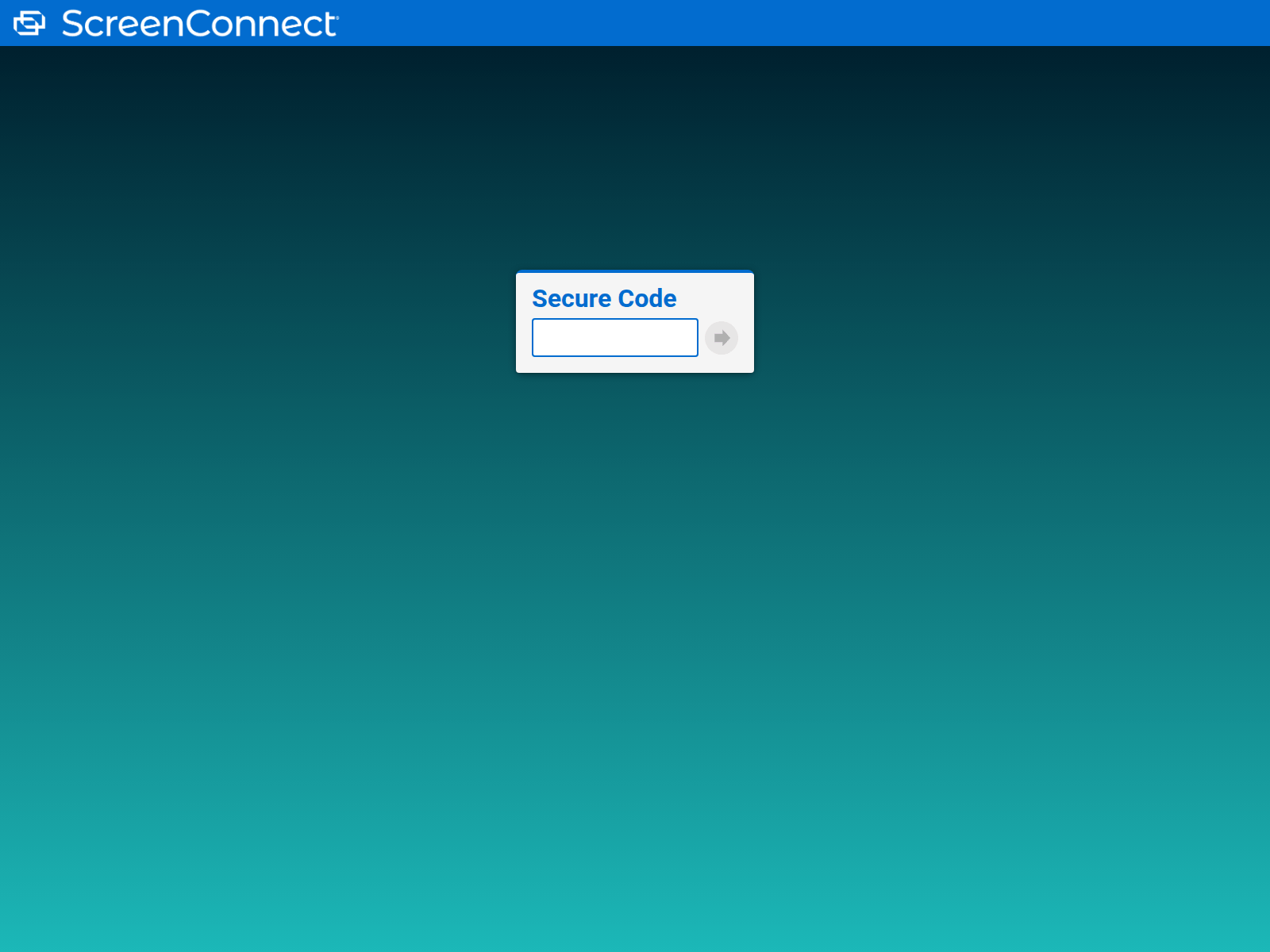
The domain bck2.pbkd198.ru displays a ScreenConnect remote support portal prompting visitors to enter a secure connection code. If you entered a code here, disconnect any active remote sessions immediately.
URLScanによるキャプチャ · 2026-11-19 21:10 UTC · SHA-256 1dcf4650…7647754
PhishDestroyの分析(レビュー済み版)
元のフォレンジック記録を保持するため、下の PhishDestroy AI 詳細分析は英語のままです。
ScreenConnect secure code interface
The page presents a dark blue and teal gradient background that mimics the standard ScreenConnect remote support interface. In the top left corner, it displays the "ScreenConnect" brand name beside its logo icon. Centered on the screen is a white box titled "Secure Code" featuring an empty text entry field and a gray button with a right-arrow symbol. The layout invites visitors to type in a remote support code to establish a connection. urlscan classified the page as malicious, and 5 of 92 engines on VirusTotal flagged it on 19 Nov 2026, with Webroot, SOCRadar and alphaMountain.ai among them.
Remote access risks and telemetry
PhishDestroy's evidence score for it is 50/100 (high). Because the site was still reachable on 19 Nov 2026 at 22:11 UTC, entering a code into this prompt can grant unauthorized remote access to your device or network. Security vendors flag the URL because it exploits trusted remote support branding to trick users into connecting. Always verify support addresses directly with your IT provider instead of entering codes into unfamiliar links.
Recommended precautions and response
If you reached this page from an unverified link or communication, close the browser tab immediately and do not input any codes. For individuals who already entered a support code, check your system for newly installed remote management software, terminate any active support connections, and run a complete antivirus scan. Always navigate to support tools using official bookmarks or known corporate channels.
bck2.pbkd198.ru displays a ScreenConnect remote access portal requesting a code, flagged by urlscan and 5 VirusTotal engines. Do not submit data.
AIによる要約
ScreenConnect secure code interface The page presents a dark blue and teal gradient background that mimics the standard ScreenConnect remote support interface. In the top left corner, it displays the "ScreenConnect" brand name beside its logo icon. Centered on the screen is a white box titled "Secure Code" featuring an empty text entry field and a gray button with a right-arrow symbol. The layout invites visitors to type in a remote support code to establish a connection. urlscan classified the page as malicious, and 5 of 92 engines on VirusTotal flagged it on 19 Nov 2026, with Webroot, SOCRadar and alphaMountain.ai among them. Remote access risks and telemetry PhishDestroy's evidence score for it is 50/100 (high). Because the site was still reachable on 19 Nov 2026 at 22:11 UTC, entering a code into this prompt can grant unauthorized remote access to your device or network. Security vendors flag the URL because it exploits trusted remote support branding to trick users into connecting. Always verify support addresses directly with your IT provider instead of entering codes into unfamiliar links. Recommended precautions and response If you reached this page from an unverified link or communication, close the browser tab immediately and do not input any codes. For individuals who already entered a support code, check your system for newly installed remote management software, terminate any active support connections, and run a complete antivirus scan. Always navigate to support tools using official bookmarks or known corporate channels.
エビデンスレイヤーAvailability: Content servingContent: Content served at rootDNS: Resolved
最新のHTTP観測結果コンテンツ公開中通常のHTTPコンテンツが配信される90%2026-11-21 11:12 UTC
RDAP登録
観測されたタイムラインlast reachable: 2026-11-22 11:11 UTClast content: 2026-11-22 11:11 UTC
Availability, content, DNS and registration are independent evidence layers. NXDOMAIN, an unreachable origin or missing content alone does not prove registrar action. A registrar or provider is credited only when a direct technical marker identifies that actor. Report causality is shown separately.

 85.137.56.162


 Microsoft
 Cloudflare
 Yandex
 ESET
 ビットディフェンダー
 Norton
 Symantec
 Avira
 Avast / AVG
 カスペルスキー
 Dr.Web
 ネットクラフト
 PhishTank
 APWG eCX
 PhishStats
 Phish.Report
 PolySwarm
 CheckPhish
 Quttera
 URLquery
 Criminal IP
 CRDF
 Scamadviser
 MyWOT