



 ChainPatrol
 Web-Check
  SOCRadar
  LeakIX
Domain security and threat intelligence
coincapmarketlistinghub-ui[.]netlify[.]app
“CoinMarketCap Community Listing Vote”
Threat verdict
Critical
90/100 evidence score
Availability
Unverified
Current reachability is unverified
Risk signals
VirusTotal detections: 6/91
Stored blocklist matches: 3
Evidence Summary
CRITICAL
coincapmarketlistinghub-ui.netlify.app was added to a security blocklist on [date? not provided]. The blocklist entry cites phishing usage and the domain is actively blocked by the PhishDestroy filtering service. A VirusTotal scan performed on the domain returned results from 91 anti‑malware engines; none of the engines reported a detection at the time of analysis.
The lack of detections does not guarantee that the site is benign, as phishing pages often evade automated scanners. No additional intelligence such as Safe Browsing verdicts, Open Threat Exchange (OTX) tags, registrar information, hosting IP, ASN, or SSL certificate details has been released for this host. Consequently, the infrastructure surrounding the domain remains opaque, and the precise phishing campaign (targeted brand, credential‑stealing page, or malicious payload) cannot be confirmed. Defenders should treat the domain as malicious until further evidence proves otherwise.
Recommended actions include adding the hostname to outbound web filtering rules, updating intrusion‑prevention signatures to drop traffic to the domain, and monitoring DNS logs for any resolution attempts. Organizations employing web‑proxy or secure web gateway solutions should ensure the blocklist that flagged the domain is enabled. Continuous re‑scanning with multiple engines is advised, as threat actors frequently modify content to bypass detection. Incident response teams should collect any client‑side artifacts that reference the URL for deeper forensic analysis.
VirusTotal
6 det.
URLScan
Scamadviser
80/100
TLS Certificate
DigiCert Inc
Observed status
Unverified

DestroyList
Listed
Data coverage
VirusTotal
6 / 91
URLQuery
not checked
PhishStats
not checked
OTX
no community references
CF Radar
scan completed
URLScan capture
stored report
URLScan verdict
Analysis completed
DNS blocks
not checked
TLS
valid certificate, 227d
WHOIS
not parsed
Screenshot
3 captures · 3 sources
Redirect chain
not probed
Scamadviser
80/100
Threat Response Pipeline
Discovery
Checks
Reports
Availability
11/13
Public Blocklist Status
Stored Capture
Domain Intelligence
Domain
URLScan Verdict
Analysis completed
score 0 report ↗
Wallet IoCs
3 format-validated
0x55d398326f99059ff775485246999…
0x833589fcd6edb6e08f4c7c32d4f71…
0xa0b86991c6218b36c1d19d4a2e9eb…
Telegram IoCs
2 extracted
https://t.me/share/url?url=
https://t.me/CoinMarketCap
Server / ASN
Netlify · AS16509 Amazon.com, Inc.
IP Context
Netlify shared edge
origin IP hidden
Edge-IP reputation is not attributed to this domain.
Platform provider
Netlify
 (US)
(US)
(US)
IP Address
63.176.8.218
CDN
Geo Frankfurt am Main, DE
Frankfurt am Main, DENetworkAS16509 · AWS EC2 (eu-central-1)
The origin IP is hidden behind a CDN proxy. Reverse-IP results for the edge address contain unrelated tenants; finding the origin requires passive DNS or certificate-transparency data.
Technical detailsDNS, SSL SANs, timestamps
First DetectedAug 4, 2026
IoC Extractionscanned Aug 5, 20263 wallet · 2 Telegram IoCs
Submitted URLhttp://coincapmarketlistinghub-ui.netlify.app/
TLS Fingerprint
TLS Observationvalid from Feb 16, 2026scanned Aug 4, 2026
TLS SAN Domainsnetlify.app
Favicon Hash
Technologies · 2 identified
N
Netlify
PaaS
CDN
Netlify providers hosting and server-less backend services for web applications and static websites.
www.netlify.com 100% confidence
H
HSTS
Security
HTTP Strict Transport Security (HSTS) informs browsers that the site should only be accessed using HTTPS.
www.rfc-editor.org 100% confidence
Detected via Cloudflare Radar · Wappalyzer engine
Report This Domain
Submit evidence & help protect others
VirusTotal Analysis
6 / 91 security vendors flagged this domain
View on VT
Last analyzed First positive detection Previous stored snapshot: 5 detections
alphaMountain.ai
Forcepoint ThreatSeeker
Fortinet
G-Data
Sophos
Webroot
Archived Evidence
Wayback Machine Snapshot
A historical snapshot is available for evidence review
Site Performance Analysis
Google PageSpeed Insights — mobile performance audit of coincapmarketlistinghub-ui.netlify.app · checked Aug 4, 2026
72
Needs Work
Performance
FCP
1.5s
First Contentful Paint
LCP
2.42s
Largest Contentful Paint
CLS
0
Cumulative Layout Shift
TBT
1126ms
Total Blocking Time
SI
4.05s
Speed Index
Powered by Google PageSpeed Insights · Mobile strategy · Scores: 90-100 Good 50-89 Needs Work 0-49 Poor
Evidence & External Reports
Security Analysis
OSINT & Intelligence
DNS & Network
SEO & Domain
Report
Were You Affected by This Site?
If credentials were compromised, report immediately. Do not engage with recovery scammers.
If a wallet, seed phrase, or account was exposed, report the incident immediately. Revoke approvals and move remaining assets to a new wallet created on a trusted device.

Action Fraud
Report fraud and cybercrime in England, Wales and Northern Ireland
Contact centre0300 123 2040
Chainabuse
Report a crypto wallet, transaction, or phishing URL
SEAL-ISAC
Security Alliance crypto threat intelligence
PhishDestroy listing review Not a law-enforcement report
Domain Appeal
Request a review if you own this domain and believe the listing is incorrect
Beware of recovery scammers! Recovery scammers may pose as investigators, lawyers, or tracing services. Do not pay upfront fees or disclose credentials. Guaranteed crypto recovery is a fraud indicator. Learn more about recovery fraud →
Report to Your Local Authorities
Select your country to get official cybercrime contacts, or create a complaint draft →.
97-country directory
Template-based draft • optional AI wording assistance requires separate consent
Review and submit it yourself
Related Infrastructure & Reports
Content matches 5
Other reports on shared Netlify edge 6
Shared edge IP; unrelated tenants may be present.
Same registrar: Netlify 6
 monad-ambient-finance.netlify.app
  deploy-preview-19103--ethereumorg.netlify.app
 Recent threat reports 3
Recently added threat reports.
 finglobalheritage.online
  metamask-k.blogspot.com.ng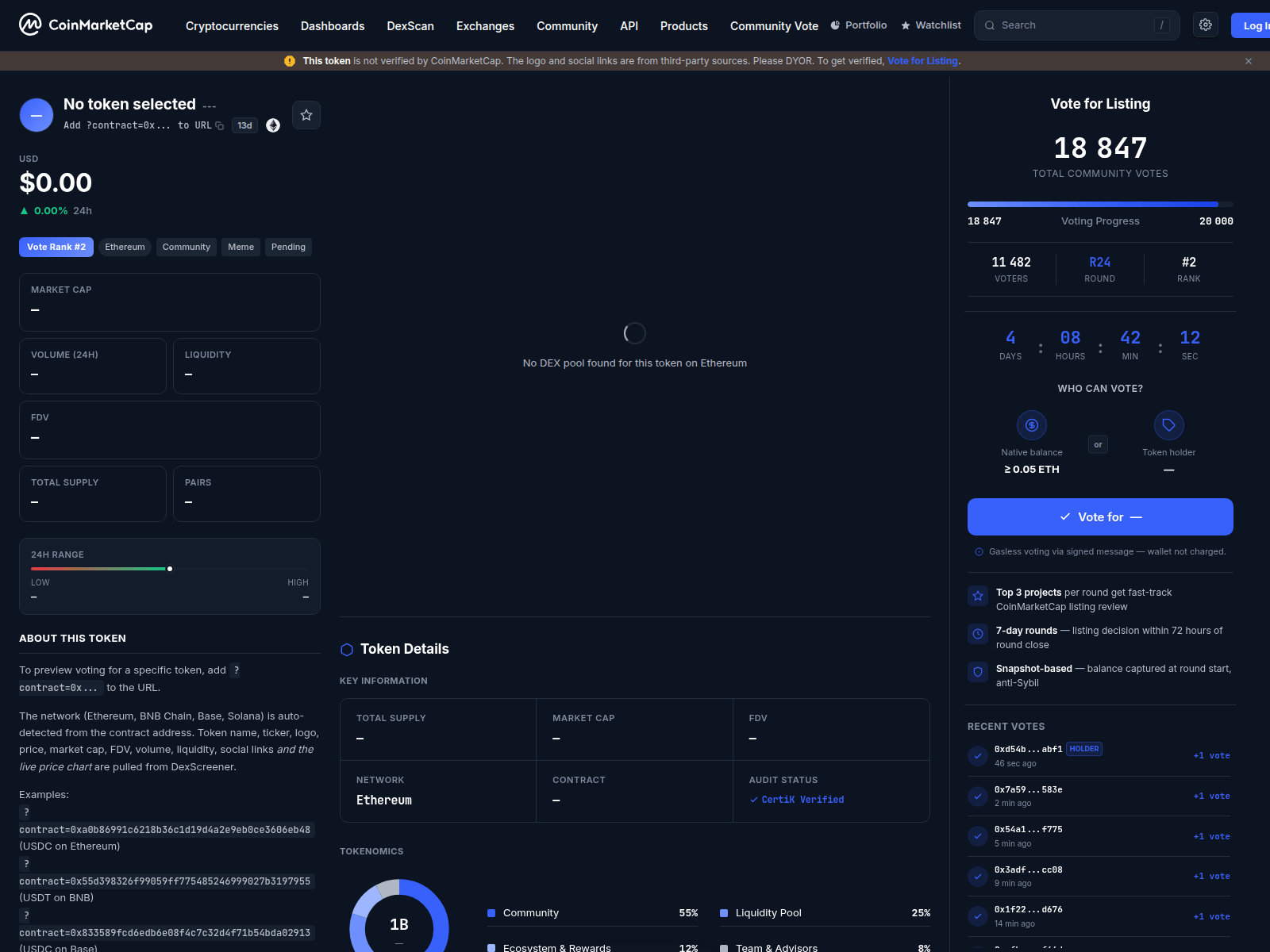
Check Any Domain
Threat analysis using stored blocklist, WHOIS, DNS, and public scan evidence
Scan NowReport Phishing
Submit suspicious domains to our threat database — protect the community
ReportLive Threat Feed
Recent phishing reports and observed availability changes
MonitorStay Informed, Stay Safe
Monitor live threats or contest this listing if you believe it's a false positive
Recommendations & Advice for Victims
An estimated $51 billion flowed to illicit crypto wallets in 2024 (source). If you interacted with coincapmarketlistinghub-ui.netlify.app — act now.
What should I do immediately?
Urgent
- Revoke token approvals — use revoke.cash to remove access granted to malicious smart contracts
- Move remaining funds to a brand-new wallet. The compromised wallet is no longer safe
- Change all passwords — email, exchange accounts, anything that shares the same password
- Enable 2FA using an authenticator app (not SMS). Disable SMS-based recovery
- Freeze cards if you entered banking details on the phishing site
What information should I collect for my report?
FBI guidelines
According to the FBI, the most important details are transaction data:
- Cryptocurrency addresses — scammer's wallet (e.g.,
0x5856...35985) - Amount & crypto type — exact amount (e.g., 1.02345 ETH, 0.5 BTC, 500 USDT)
- Transaction ID (hash) — the unique blockchain transaction identifier
- Exact dates & times — of each transaction and first contact with scammer
- Screenshots — scam website, chat messages, emails, wallet transactions, social media
- All URLs & domains used by the scammer (including
coincapmarketlistinghub-ui.netlify.app) - Communications — emails, texts, phone numbers, usernames the scammer used
Even if you don't have all details — file a report anyway. Partial information still helps investigations.
Where should I report the scam?
- FBI IC3 — Internet Crime Complaint Center (US federal reporting)
- Europol — European cybercrime reporting (EU)
- Chainabuse — flag scam wallets across exchanges & platforms
- Your crypto exchange — notify its fraud team immediately; it may be able to preserve records or restrict funds held on its platform
- Local police — creates an official record, even if they can't act immediately
A report is not a guarantee of recovery or investigation, but prompt, accurate transaction data can help authorities and service providers trace the incident.
How do crypto scams typically work?
- Fake websites — pixel-perfect clones of legitimate sites with slightly altered domains
- Malicious approvals — "connect wallet" prompts that grant unlimited token spending to attackers
- Pig butchering — trust built over weeks via Telegram/WhatsApp/dating apps, then money stolen
- Recovery scams — fraudsters pose as recovery agents and demand upfront fees. Never share a seed phrase or pay before independently verifying the provider
- Fake ads & airdrops — Google/social media ads and "free token" offers leading to wallet drainers
- AI-powered scams — deepfakes, automated phishing, and AI-generated sites making fraud harder to detect
How can I protect myself in the future?
- Use a hardware wallet (Ledger, Trezor). Never store large amounts in browser wallets
- Bookmark official sites — never click links from emails, DMs, or ads
- Read every approval — verify permissions before signing. Reject unlimited approvals
- Verify domains — check on PhishDestroy before interacting. Check HTTPS, spelling, domain age
- "Too good to be true" = scam — guaranteed returns, celebrity endorsements, urgent deadlines