PhishDestroy first recorded trezor-help.support on 2026-06-15. Stored VirusTotal result: 15/92 engines flagged. Malicious: 14. Suspicious: 1. Analysis time (as stored): 2026-10-27 23:17 UTC. Retrieved (as stored): 2026-10-30 07:10 UTC. Listed by external blocklists: MetaMask, SEAL.
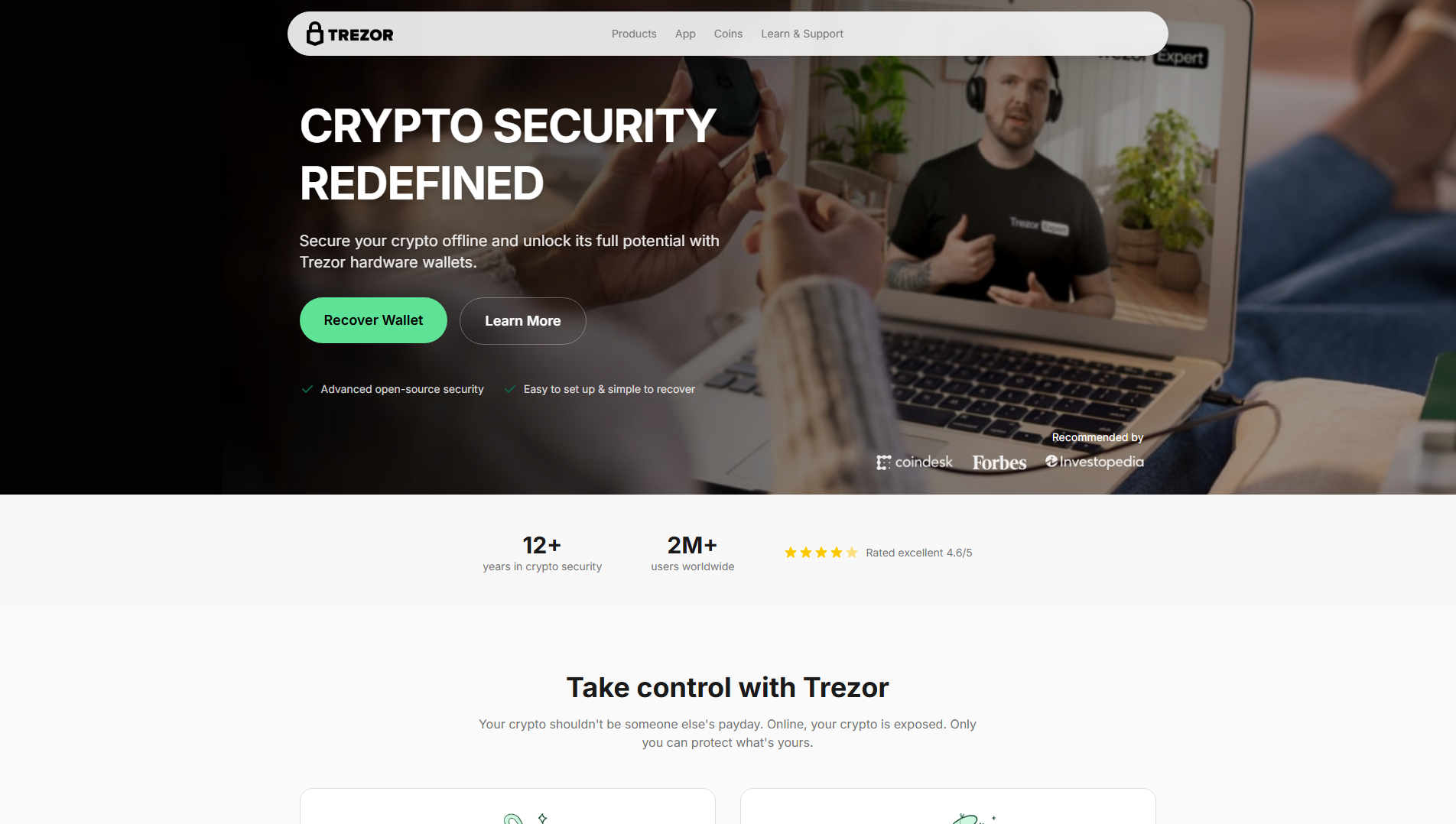
Page title: “Trezor Wallet Recovery”
More about the sources
Recorded security signals
Stored VirusTotal result: 15/92 engines flagged. Malicious: 14. Suspicious: 1. Analysis time (as stored): 2026-10-27 23:17 UTC. Retrieved (as stored): 2026-10-30 07:10 UTC. Listed by external blocklists: MetaMask, SEAL. Use caution — do not enter credentials or personal information.
Expert view has every section: DNS, TLS, network requests, hashes and the raw JSON.
ABUSE NOTICE · 7D+ OPEN Outgoing abuse reports are recorded; the latest stored availability evidence still shows the domain reachable.
Notification and current-status evidence
The sent-report ledger records the first outgoing report at . The recorded recipient is abuse@name.com. The latest stored availability evidence still shows the domain reachable; 5 months has elapsed since the first outgoing report.
ICANN RAA §3.18 describes registrar abuse-contact and handling obligations. This section records outgoing timestamps, listed recipients, case identifiers, and later availability. It does not by itself prove receipt, acknowledgement, investigation, remediation, or contractual non-compliance.
Elapsed since first report
5 months
Reports sent
1
Latest case ID
PD-20260617-C4F1EA
Current status
Observed active at latest stored check
Analysis
Domain summary
PhishDestroy first recorded trezor-help.support on 2026-06-15. Stored VirusTotal result: 15/92 engines flagged. Malicious: 14. Suspicious: 1. Analysis time (as stored): 2026-10-27 23:17 UTC. Retrieved (as stored): 2026-10-30 07:10 UTC. Listed by external blocklists: MetaMask, SEAL. Risk: critical (evidence score 100/100). Registrar: Name.com. Hosting: Google LLC. PhishDestroy sent 1 abuse report. Do not enter credentials or connect a wallet.
The domain trezor-help.support is currently active and operates as a brand impersonation scam specifically targeting Trezor, a well-known cryptocurrency hardware wallet provider. Analysis confirms this domain is designed to deceive users into entering sensitive wallet recovery information, likely functioning as a crypto drainer to siphon digital assets from victims. The site remains operational despite multiple security detections, posing a high-risk threat to unsuspecting users seeking wallet recovery services. Infrastructure analysis reveals the domain was registered on June 15, 2026, through Name.com, Inc., an uncommon future registration date that may indicate an attempt to evade immediate detection. The domain resolves to IP address 34.111.179.208 and uses an SSL certificate issued by Let's Encrypt (identifier E7), providing a false sense of security. Security vendors have flagged this domain in 22 of 95 VirusTotal scans, with active blocks implemented by PhishDestroy, MetaMask, and SEAL. The domain appears on three distinct security blocklists, and its page title, 'Trezor Wallet Recovery,' directly mimics official Trezor support pages to enhance credibility. Current threat status remains active, with no indications of takedown or mitigation. Users are strongly advised to avoid interacting with this domain and any associated pages. Trezor wallet holders should exclusively use the official support channels verified through the legitimate Trezor website. Security teams are recommended to update blocklists with the domain and IP address, monitor for similar impersonation attempts, and educate users on verifying domain authenticity before entering sensitive wallet information. The combination of brand impersonation, active security flags, and direct targeting of cryptocurrency recovery processes underscores the critical need for heightened vigilance in this threat landscape.
This is a separate stored result. Its counts, vendors and dates do not replace the provider observation above. A retrieval date is not an analysis date.
Open report Title, description and generation record
The narrative generation date is separate from observation dates. These are the retained publication fields, not an additional independent detection.
AI title
Is trezor-help.support a Trezor Crypto Drainer Scam?
AI description
trezor-help.support is an active brand impersonation scam targeting Trezor users. Flagged by 22/95 VirusTotal vendors as a crypto drainer threat, this domain.
AI summary
The domain trezor-help.support is currently active and operates as a brand impersonation scam specifically targeting Trezor, a well-known cryptocurrency hardware wallet provider. Analysis confirms this domain is designed to deceive users into entering sensitive wallet recovery information, likely functioning as a crypto drainer to siphon digital assets from victims. The site remains operational despite multiple security detections, posing a high-risk threat to unsuspecting users seeking wallet recovery services. Infrastructure analysis reveals the domain was registered on June 15, 2026, through Name.com, Inc., an uncommon future registration date that may indicate an attempt to evade immediate detection. The domain resolves to IP address 34.111.179.208 and uses an SSL certificate issued by Let's Encrypt (identifier E7), providing a false sense of security. Security vendors have flagged this domain in 22 of 95 VirusTotal scans, with active blocks implemented by PhishDestroy, MetaMask, and SEAL. The domain appears on three distinct security blocklists, and its page title, 'Trezor Wallet Recovery,' directly mimics official Trezor support pages to enhance credibility. Current threat status remains active, with no indications of takedown or mitigation. Users are strongly advised to avoid interacting with this domain and any associated pages. Trezor wallet holders should exclusively use the official support channels verified through the legitimate Trezor website. Security teams are recommended to update blocklists with the domain and IP address, monitor for similar impersonation attempts, and educate users on verifying domain authenticity before entering sensitive wallet information. The combination of brand impersonation, active security flags, and direct targeting of cryptocurrency recovery processes underscores the critical need for heightened vigilance in this threat landscape.
PhishDestroy rates trezor-help.support as critical risk (evidence score 100/100) from the recorded evidence; it was first recorded on 2026-06-15. Stored VirusTotal result: 15/92 engines flagged. Malicious: 14. Suspicious: 1. Analysis time (as stored): 2026-10-27 23:17 UTC. Retrieved (as stored): 2026-10-30 07:10 UTC. Listed by external blocklists: MetaMask, SEAL. The local score and a listing do not prove fraud. Check each source’s date and the exact URL.
Is trezor-help.support safe to connect a wallet?
Because of the risk signals above, do not connect a wallet, sign messages or approve token permissions on trezor-help.support. A confirmed blockchain transaction cannot be reversed.
What should I do if I used trezor-help.support?
Entered a password — change it on that service and on every other site where you used the same password
Turn on two-factor authentication — where the service offers it; an authenticator app is stronger than SMS codes
Paid or entered card or bank details — contact your bank or payment service through the contacts on your card or its official website
Connected a wallet but signed nothing — disconnect the site in the wallet and reject pending requests; a connection by itself does not move funds
Approved token spending (approve / permit) — revoke that approval with a token-approval checker
Shared a seed phrase or private key — move the remaining funds to a new wallet with a new seed phrase; the exposed wallet is no longer safe
Downloaded a file — do not open it and scan the device with security software
Keep the address, dates, payment or transaction details and messages for a report to the police or another competent authority. A report does not guarantee that money is returned. Step-by-step help: emergency guide.
IP Reputation34.111.179.20841/100abuse score · abuse reports about this server's IP address, not about the domain; higher = worse78 reportsFraud OrdersPhishingOpen ProxyEmail SpamPort ScanHackingSpoofingBad Web BotExploited Hostchecked 2026-11-08last reported
DOM Analysisanalyzed 2026-10-09score 100/1001 brand signal
Submitted URLhttp://trezor-help.support/
Favicon Hash
Case ID
ICANN OVERSIGHT
Accreditation and RAA context
Registrar accreditation and DNS abuse obligations
For this gTLD, the registrar above operates under an ICANN accreditation agreement. The links below provide the official fee schedule and current DNS abuse compliance guidance.
Accreditation is a contract, not a safety certification.
RAA §3.18 establishes abuse-contact and handling requirements. This report can document stored outbound notices and later technical observations; it does not by itself establish receipt, investigation, remediation, or contractual non-compliance.
Accountability draft Nothing is sent automatically.
Network & certificates
Stored technical evidence
Network & DNS
Resolved IP
34.111.179.208
Network ASN
AS396982
Organization
Google Cloud
Observed location
Kansas City, US
Server header
Google Frontend
Nameservers 1
ns1cny.name.com
Location describes the IP network.
TLS certificate
Issuer
Let's Encrypt / YE2
Valid from
2026-07-26 15:04:33
Valid until
2026-10-24 15:04:32
Hostname match
Yes
Validity
Stored certificate expired
Collection time
2026-10-10 07:02 UTC
Collection source
PhishDestroy collector
Certificate fingerprintba445305d54bf07a165b6d3c20ecb2000e12e80fdc7e994e1da8fb43002ff0f0Certificate names · 1 SAN
trezor-help.support
Saved certificate metadata. Certificate dates without a timezone are shown as stored. Transport encryption does not establish that the site is trustworthy.
Network requests that the URLScan browser recorded while loading the page. URLScan does not provide a hash for every request. PhishDestroy retrieved this list on 2026-10-29 03:56 UTC.
Recorded events: 18. These records describe collected evidence, outgoing notifications and publication; they do not confirm a complete investigation or a takedown.
We scan suspicious URLs, inspect public results and send evidence through the appropriate abuse-reporting channels. The dated events above show what is recorded for this domain. The directory below explains the wider workflow.
01Public scans & evidence collection10 sources and tool groups
Inspect the public DNS, TLS, HTTP and technology surface.
02Abuse reports & follow-upRegistrar, hosting and security channels
Identify the responsible provider. Match registration and hosting records to the relevant abuse contact.
Prepare an evidence package. Include the URL, public scan references, captures and the recorded observations.
Send the report. Keep outgoing report records and recipient information when available.
Recheck and publish updates. Track later scanner verdicts, provider responses and site availability.
Security services used for scanning, reputation checks and reporting are listed below. A service being listed is not evidence that it received, accepted or acted on this particular domain. Recorded submissions appear in the notification history above.
Names that imitate the brand, found by dnstwist. A similar name alone does not prove the same owner.
Report all
A similar name alone does not prove fraud. Send the list to services that check each address themselves. Report a domain as phishing only if you saw a fake page on it.
Direct link — Same registrable domain or the same identified phishing kit.
Supporting signal — Shares a page feature, infrastructure or a collector label; not proof of one operator.
Discovery only — Same registrar or CDN edge: listed for navigation, not evidence of a link.
Each spoke is one reason a domain is linked to this report. Node size marks VirusTotal detections, dashed nodes are already offline, and the full lists follow below. Full list of related reports
Recovery Scam kit8
These reports carry the same identified kit name (Recovery Scam). A shared kit is not proof of a common operator or campaign. View all campaign domains →
The domain is a live, recently registered site that presents itself as Trezor and uses wallet-recovery language aimed at crypto users. The page includes calls to recover a wallet using a recovery phrase, which is consistent with seed-phrase harvesting and phishing behavior rather
Community reports
Reported by 1 community member, first seen 2026-06-15
1 report filed for trezor-help.support (1 written by a person) · category: Impersonation · source checked
“The domain is a live, recently registered site that presents itself as Trezor and uses wallet-recovery language aimed at crypto users. The page includes calls to recover a wallet using a recovery phrase, which is consistent with seed-phrase harvesting and phishing behavior rather than legitimate support content. The domain is independently registered and hosted, so removal of the hosted content plus registrar suspension is warranted; internal blocklisting is also appropriate to reduce exposure w”
— reported by AnonymousTrusted reporter on 2026-05-12 · Source: ChainAbuse (TRM Labs) — full report and evidence there.
You are not alone and there is nothing to be ashamed of. Scammers are sophisticated criminals who exploit trust. Reporting your experience is the most powerful weapon against fraud — your report can prevent others from becoming victims and help law enforcement take action. Secure your accounts and funds first, then report. If credentials were compromised, report immediately. Do not engage with recovery scammers.
Act on what you actually did. Entered a password: change it, and wherever you reused it. Paid or gave card details: contact your bank or payment service. Downloaded a file: scan the device. Then report the incident.
Choose the steps that match what you shared. Keep a copy of this report alongside your own records.
What should I do immediately?
Urgent
Stop using the suspicious site. Open the real service through its official app or an address you already trust.
Shared a seed phrase or private key — move the remaining funds to a new wallet with a new seed phrase; the exposed wallet is no longer safe
Connected a wallet but signed nothing — disconnect the site in the wallet and reject pending requests; a connection by itself does not move funds
Approved token spending (approve / permit) — revoke that approval with a token-approval checker (revoke.cash)
Sent crypto — save the transaction hash, your address and the receiving address; blockchain transactions cannot be reversed
Entered a password — change it on that service and on every other site where you used the same password
Turn on two-factor authentication — where the service offers it; an authenticator app is stronger than SMS codes
Paid or entered card or bank details — contact your bank or payment service through the contacts on your card or its official website
Downloaded a file — do not open it and scan the device with security software
What information should I collect for my report?
FBI guidelines
Keep original emails, receipts, messages and screenshots in a secure place. A factual timeline helps the receiving authority understand what happened. IC3 evidence guidance ↗
Payment records — if you paid, save the receipt, amount, date, payment provider and recipient details.
Exact dates & times — of each transaction and first contact with scammer
Screenshots — scam website, chat messages, emails, wallet transactions, social media
All URLs & domains used by the scammer (including trezor-help.support)
Communications — emails, texts, phone numbers, usernames the scammer used
Even if you don't have all details — file a report anyway. Partial information still helps investigations.
Where should I report the scam?
FBI IC3 — Internet Crime Complaint Center (US federal reporting)
Your bank or payment provider — contact its fraud team promptly through official contact details if money or card information was exposed.
Local police — creates an official record, even if they can't act immediately
A report is not a guarantee of recovery or investigation, but prompt, accurate transaction data can help authorities and service providers trace the incident.
How do phishing scams typically work?
Fake websites — pixel-perfect clones of legitimate sites with slightly altered domains
Pig butchering — trust built over weeks via Telegram/WhatsApp/dating apps, then money stolen
Recovery scams — fraudsters pose as recovery agents and demand upfront fees. Never share a seed phrase or pay before independently verifying the provider
AI-powered scams — deepfakes, automated phishing, and AI-generated sites making fraud harder to detect
How can I protect myself in the future?
Bookmark official sites — never click links from emails, DMs, or ads
Verify domains — check on PhishDestroy before interacting. Check HTTPS, spelling, domain age
"Too good to be true" = scam — guaranteed returns, celebrity endorsements, urgent deadlines
Beware of recovery scammers! Recovery scammers may pose as investigators, lawyers, or tracing services. Do not pay upfront fees or disclose credentials.Learn more about recovery fraud →
About this reportSources, observation dates and corrections
This report combines saved page captures, registration and network records, scanner results and PhishDestroy reporting history. Each source keeps its own observation date. Open a source report to inspect the original result.
The AI-assisted analysis was written on . It describes the evidence available at that time; later source checks can change.
A capture documents what was shown. A scanner result records that provider’s assessment at the time of its check. Neither a valid certificate nor a zero-detection result is a guarantee of safety.


 Name.com
 34.111.179.208


 Microsoft
 Cloudflare
 Yandex
 ESET
 Bitdefender
 Norton
 Symantec
 Avira
 Avast / AVG
 Kaspersky
 Dr.Web
 Netcraft
 PhishTank
 APWG eCX
 PhishStats
 Phish.Report
 Spamhaus
 PolySwarm
 CheckPhish
 Quttera
 Criminal IP
 CRDF
 Scamadviser
 MyWOT