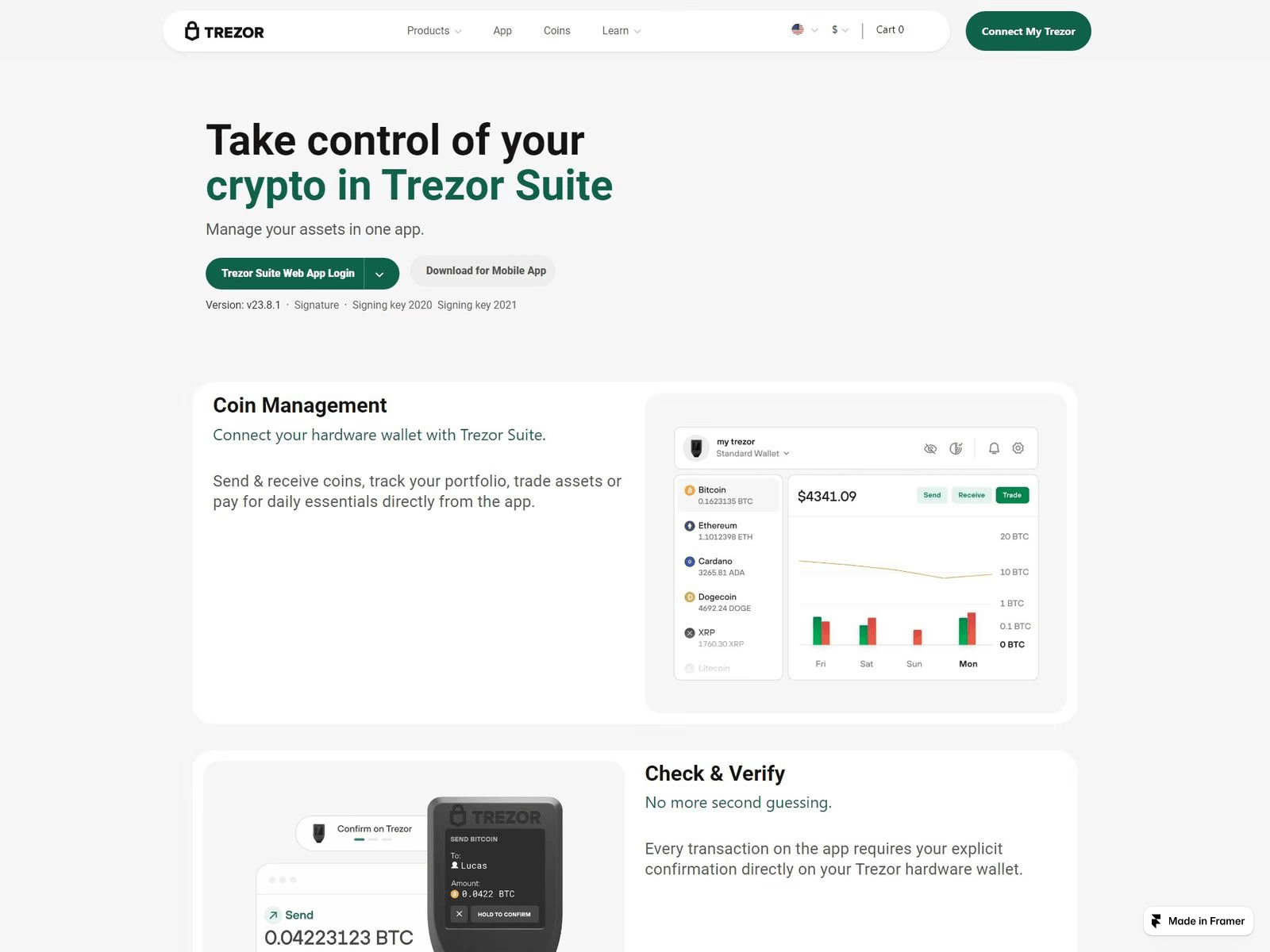
Stored VirusTotal result: 17/92 engines flagged. Analysis time (as stored): 2026-10-10 16:30 UTC. Retrieved (as stored): 2026-10-21 04:03 UTC. Use caution — do not enter credentials or personal information.
PhishDestroy first recorded en-trezor-io-start-setup.framer.ai on 2026-10-10. Stored VirusTotal result: 17/92 engines flagged. Analysis time (as stored): 2026-10-10 16:30 UTC. Retrieved (as stored): 2026-10-21 04:03 UTC.
“Trezor.io/Start – Complete 2025 Setup Guide for Trezor Hardware Wallets”
Availability HTTP 404 · Content unavailableThe saved response applies to the checked URL. It does not establish that every path on the domain is unavailable.Observed HTTP probe
PhishDestroy first recorded en-trezor-io-start-setup.framer.ai on 2026-10-10. Stored VirusTotal result: 17/92 engines flagged. Analysis time (as stored): 2026-10-10 16:30 UTC. Retrieved (as stored): 2026-10-21 04:03 UTC. Risk: critical (100/100). Registrar: CSC. Status: HTTP 404 · Content unavailable. Hosting: Amazon.com, Inc. Do not enter credentials or connect a wallet.
en-trezor-io-start-setup.framer.ai is a phishing page that impersonates Trezor's official onboarding flow. Its title is "Trezor.io/Start – Complete 2025 Setup Guide for Trezor Hardware Wallets", and it targets people unboxing a new Trezor or searching for setup help. PhishDestroy first flagged it on 2026-10-10. The site went offline on 2026-10-11 and was still dead when rechecked on 2026-10-19, so it was live for roughly a day after detection.
How the scam works
The page imitates the genuine Trezor start page, a step every new owner is told to visit, so a convincing copy catches buyers at their most trusting moment. Fake setup guides of this kind usually push one of two traps. They either ask the visitor to type the 12 or 24 word recovery seed into a web form, or they offer a counterfeit Trezor Suite download. A seed entered anywhere outside the device itself lets the operator rebuild the wallet and empty it, and the theft cannot be reversed.
Evidence
On 2026-10-10, 7 of 92 VirusTotal engines flagged the page: alphaMountain.ai, Emsisoft, Fortinet, LevelBlue, Netcraft, PhishFort and Webroot. That is a modest count, but it includes phishing-focused vendors such as Netcraft and PhishFort. urlscan.io independently rated the page malicious and identified Trezor branding on it. PhishDestroy lists the domain on its blocklist.
Infrastructure
The page was a subdomain on Framer, a website-builder platform. Free builders like this let anyone publish a polished page in minutes under a trusted parent domain. The 2018-01-06 registration date and the CSC Corporate Domains registrar belong to framer.ai itself, not to the scammer, so domain age says nothing reassuring here. Hosting resolved to Amazon's network (AS16509) in the Netherlands, which is consistent with the platform's own infrastructure.
What to do
If you typed your recovery seed into this page, treat the wallet as compromised. Set up a new wallet with a fresh seed on your Trezor and move any remaining funds there immediately. If you downloaded software from the page, uninstall it, run a malware scan and get Trezor Suite only from Trezor's official site. Remember that Trezor never asks for your seed on a website or in an app. Defenders should block this subdomain, watch for brand-named subdomains on site-builder platforms, and report new lookalikes to the hosting platform for fast removal.
This is a separate stored result. Its counts, vendors and dates do not replace the provider observation above. A retrieval date is not an analysis date.
Open report Separate monitor score · 75 / 100 · 2026-10-10T22:20:10Z
This dated monitor analysis is separate from the primary PhishDestroy analysis above. A heuristic score is not a measured probability.
Heuristic score
75
Analyzed at
2026-10-10T22:20:10Z
Source timestamp
2026-10-11 00:20:10
PhishDestroy narrative
Narrative generation metadata
Open report Title, description and generation record
The narrative generation date is separate from observation dates. These are the retained publication fields, not an additional independent detection.
Ai summary
Overview en-trezor-io-start-setup.framer.ai is a phishing page that impersonates Trezor's official onboarding flow. Its title is "Trezor.io/Start – Complete 2025 Setup Guide for Trezor Hardware Wallets", and it targets people unboxing a new Trezor or searching for setup help. PhishDestroy first flagged it on 2026-10-10. The site went offline on 2026-10-11 and was still dead when rechecked on 2026-10-19, so it was live for roughly a day after detection. How the scam works The page imitates the genuine Trezor start page, a step every new owner is told to visit, so a convincing copy catches buyers at their most trusting moment. Fake setup guides of this kind usually push one of two traps. They either ask the visitor to type the 12 or 24 word recovery seed into a web form, or they offer a counterfeit Trezor Suite download. A seed entered anywhere outside the device itself lets the operator rebuild the wallet and empty it, and the theft cannot be reversed. Evidence On 2026-10-10, 7 of 92 VirusTotal engines flagged the page: alphaMountain.ai, Emsisoft, Fortinet, LevelBlue, Netcraft, PhishFort and Webroot. That is a modest count, but it includes phishing-focused vendors such as Netcraft and PhishFort. urlscan.io independently rated the page malicious and identified Trezor branding on it. PhishDestroy lists the domain on its blocklist. Infrastructure The page was a subdomain on Framer, a website-builder platform. Free builders like this let anyone publish a polished page in minutes under a trusted parent domain. The 2018-01-06 registration date and the CSC Corporate Domains registrar belong to framer.ai itself, not to the scammer, so domain age says nothing reassuring here. Hosting resolved to Amazon's network (AS16509) in the Netherlands, which is consistent with the platform's own infrastructure. What to do If you typed your recovery seed into this page, treat the wallet as compromised. Set up a new wallet with a fresh seed on your Trezor and move any remaining funds there immediately. If you downloaded software from the page, uninstall it, run a malware scan and get Trezor Suite only from Trezor's official site. Remember that Trezor never asks for your seed on a website or in an app. Defenders should block this subdomain, watch for brand-named subdomains on site-builder platforms, and report new lookalikes to the hosting platform for fast removal. Useful links urlscan.io scan and screenshot: https://urlscan.io/result/01a125e9-fe50-7119-ba6a-335615a2817b/ VirusTotal report: https://www.virustotal.com/gui/domain/en-trezor-io-start-setup.framer.ai Google Safe Browsing status: https://transparencyreport.google.com/safe-browsing/search?url=en-trezor-io-start-setup.framer.ai Archived copy: https://web.archive.org/web/20261010140727/https://en-trezor-io-start-setup.framer.ai/ Report phishing to Google: https://safebrowsing.google.com/safebrowsing/report_phish/ Site owner? Request a review: https://phishdestroy.io/appeals/
Earlier stored analysis, not reviewed; text generation time is separate from source observation dates.
Results reflect each source’s collection time. Zero detections do not guarantee safety. OTX references are community publications.
Collected source details
Stored page, network and scanner observations, grouped by source and observation time.
Every stored field, with its source and date
Network Security Intelligence
Cloudflare Radar VerdictMalicious
Phishing Security threats Phishing
Questions about en-trezor-io-start-setup.framer.ai
Is en-trezor-io-start-setup.framer.ai legit?
PhishDestroy rates en-trezor-io-start-setup.framer.ai as critical risk (100/100) from the recorded evidence; it was first recorded on 2026-10-10. Stored VirusTotal result: 17/92 engines flagged. Analysis time (as stored): 2026-10-10 16:30 UTC. Retrieved (as stored): 2026-10-21 04:03 UTC. The local score and a listing do not prove fraud. Check each source’s date and the exact URL.
Is en-trezor-io-start-setup.framer.ai safe to connect a wallet?
This report does not record which wallet requests en-trezor-io-start-setup.framer.ai makes. Because of the risk signals above, do not connect a wallet, sign messages or approve token permissions there. A confirmed blockchain transaction cannot be reversed.
What should I do if I used en-trezor-io-start-setup.framer.ai?
It depends on what you did. If you entered a password, change it, and also on every other site where you used the same password; turn on two-factor authentication where it is offered. If you paid or gave card or bank details, contact your bank or payment service through the contacts on your card or its official website. If you only connected a wallet, disconnect the site in the wallet and reject pending requests; a connection by itself does not move funds. If you signed a token approval or permit, revoke it with a token-approval checker. If you shared a seed phrase or private key, treat the wallet as compromised and move the remaining funds to a new wallet with a new seed phrase. If you downloaded a file, do not open it and scan the device with security software. Keep the address, dates, payment or transaction details and messages for a report to the police or another competent authority; a report does not guarantee that money is returned. Step-by-step help: emergency guide.
Registration (base domain)framer.ai · Created Jan 6, 2018 —Expires Jan 5, 2028
HTTP Status404 Not Found
Elapsed Since First Report11h
What we count Raw elapsed time since the first stored abuse report. It is not a registrar response-time measurement. Latest observed status: HTTP 404 · Content unavailable.
What each report contains Stored outgoing-report records may reference evidence available at the time, such as vendor verdicts, registration data, hosting details, classifications, or screenshots. This page does not infer the exact payload delivered, receipt, acknowledgement, or action by a recipient.
Technical detailsProvenance & timestamps
First DetectedOct 10, 2026
DOM Analysisanalyzed Oct 11, 2026score 75/1004 brand signals
Trezor.io/Start – Complete 2025 Setup Guide for Trezor Hardware Wallets
Automated brand references
EthereumGoogleSolanaTrezor
TLS Certificate
Issued by Let's Encrypt / YE1· stored validity ends in 7 days
Network & certificates
Stored technical evidence
Network & DNS
Resolved IP
31.43.160.6
Network ASN
AS16509
AS name
AMAZON-02 - Amazon.com, Inc., US
Organization
Amazon.com, Inc.
Observed location
Amsterdam, NL
Server header
Framer/26fa766
Nameservers 1
ns-635.awsdns-15.net
Location describes the IP network.
TLS certificate
Issuer
Let's Encrypt / YE1
Valid from
2026-08-23 22:12:45
Valid until
2026-11-21 22:12:44
Hostname coverage
Stored certificate dates valid
Validity
Within stored validity dates
Collection time
2026-10-10 22:02:03 UTC
Collection source
PhishDestroy collector
Certificate fingerprint9f5bcd50e206d3b40bada3d3c2c118828e951897dd47ee524da4b30ed72cfdc9Certificate names · 1 SAN
*.framer.ai
Saved certificate metadata. Certificate dates without a timezone are shown as stored. Transport encryption does not establish that the site is trustworthy.
Network requests that the URLScan browser recorded while loading the page. URLScan does not provide a hash for every request. PhishDestroy retrieved this list on 2026-10-29 02:17 UTC.
Recorded events: 13. These records describe collected evidence, outgoing notifications and publication; they do not confirm a complete investigation or a takedown.
Pre-emptive Discovery & IngestionThreat Ingested1/1Recorded: 1 of 1
Threat Ingested
en-trezor-io-start-setup.framer.ai detected and queued for full analysis
We scan suspicious URLs, inspect public results and send evidence through the appropriate abuse-reporting channels. The dated events above show what is recorded for this domain. The directory below explains the wider workflow.
01Public scans & evidence collection10 sources and tool groups+
Inspect the public DNS, TLS, HTTP and technology surface.
02Abuse reports & follow-upRegistrar, hosting and security channels+
Identify the responsible provider. Match registration and hosting records to the relevant abuse contact.
Prepare an evidence package. Include the URL, public scan references, captures and the recorded observations.
Send the report. Keep outgoing report records and recipient information when available.
Recheck and publish updates. Track later scanner verdicts, provider responses and site availability.
Security services used for scanning, reputation checks and reporting are listed below. A service being listed is not evidence that it received, accepted or acted on this particular domain. Recorded submissions appear in the notification history above.
Supporting signal — Shares a page feature, infrastructure or a collector label; not proof of one operator.
Discovery only — Same registrar or CDN edge: listed for navigation, not evidence of a link.
Each spoke is one reason a domain is linked to this report. Node size marks VirusTotal detections, dashed nodes are already offline, and the full lists follow below. Full list of related reports
Content matches4
Same favicon file hash, or a recorded page title that starts with the same 20 characters. A content match does not establish a shared phishing kit or owner.
4 evidence signal groups linkedHTTP 404 · Content unavailable
You are not alone and there is nothing to be ashamed of. Scammers are sophisticated criminals who exploit trust. Reporting your experience is the most powerful weapon against fraud — your report can prevent others from becoming victims and help law enforcement take action. Silence is the scammer’s greatest advantage. Break it.
If credentials were compromised, report immediately. Do not engage with recovery scammers.
Act on what you actually did. Entered a password: change it, and wherever you reused it. Paid or gave card details: contact your bank or payment service. Downloaded a file: scan the device. Then report the incident.
If you made a payment, contact your bank or payment service through its official contacts as soon as possible. Keep the address, dates, payment or transaction details and messages for a report to the police or another competent authority. A report does not guarantee that money is returned.
Scammers are criminals. Filing a report creates a legal record and helps protect others.
97-country directory
Template-based draft • optional AI wording assistance requires separate consent
Review and submit it yourself
After a phishing incident
Recommendations & Advice for Victims
Choose the steps that match what you shared. Keep a copy of this report alongside your own records.
What should I do immediately?
Urgent
Stop using the suspicious site. Open the real service through its official app or an address you already trust.
Entered a password — change it on that service and on every other site where you used the same password
Turn on two-factor authentication — where the service offers it; an authenticator app is stronger than SMS codes
Paid or entered card or bank details — contact your bank or payment service through the contacts on your card or its official website
What information should I collect for my report?
FBI guidelines
Keep original emails, receipts, messages and screenshots in a secure place. A factual timeline helps the receiving authority understand what happened. IC3 evidence guidance ↗
Payment records — if you paid, save the receipt, amount, date, payment provider and recipient details.
Exact dates & times — of each transaction and first contact with scammer
Screenshots — scam website, chat messages, emails, wallet transactions, social media
All URLs & domains used by the scammer (including en-trezor-io-start-setup.framer.ai)
Communications — emails, texts, phone numbers, usernames the scammer used
Even if you don't have all details — file a report anyway. Partial information still helps investigations.
Where should I report the scam?
FBI IC3 — Internet Crime Complaint Center (US federal reporting)
Your bank or payment provider — contact its fraud team promptly through official contact details if money or card information was exposed.
Local police — creates an official record, even if they can't act immediately
A report is not a guarantee of recovery or investigation, but prompt, accurate transaction data can help authorities and service providers trace the incident.
How do phishing scams typically work?
Fake websites — pixel-perfect clones of legitimate sites with slightly altered domains
Pig butchering — trust built over weeks via Telegram/WhatsApp/dating apps, then money stolen
Recovery scams — fraudsters pose as recovery agents and demand upfront fees. Never share a seed phrase or pay before independently verifying the provider
AI-powered scams — deepfakes, automated phishing, and AI-generated sites making fraud harder to detect
How can I protect myself in the future?
Bookmark official sites — never click links from emails, DMs, or ads
Verify domains — check on PhishDestroy before interacting. Check HTTPS, spelling, domain age
"Too good to be true" = scam — guaranteed returns, celebrity endorsements, urgent deadlines
Beware of recovery scammers! Recovery scammers may pose as investigators, lawyers, or tracing services. Do not pay upfront fees or disclose credentials.Learn more about recovery fraud →
About this reportSources, observation dates and corrections
This report combines saved page captures, registration and network records, scanner results and PhishDestroy reporting history. Each source keeps its own observation date. Open a source report to inspect the original result.
The AI-assisted analysis was written on . It describes the evidence available at that time; later source checks can change.
A capture documents what was shown. A scanner result records that provider’s assessment at the time of its check. Neither a valid certificate nor a zero-detection result is a guarantee of safety.


 CSC
 31.43.160.6




 Microsoft
 Cloudflare
 Yandex
 ESET
 Bitdefender
 Norton
 Symantec
 Avira
 Avast / AVG
 Kaspersky
 Dr.Web
 Netcraft
 PhishTank
 APWG eCX
 PhishStats
 Phish.Report
 PolySwarm
 CheckPhish
 Quttera
 Criminal IP
 CRDF
 Scamadviser
 MyWOT